How to Replace the Battery in a Ford F-150 (Any Year & Engine)
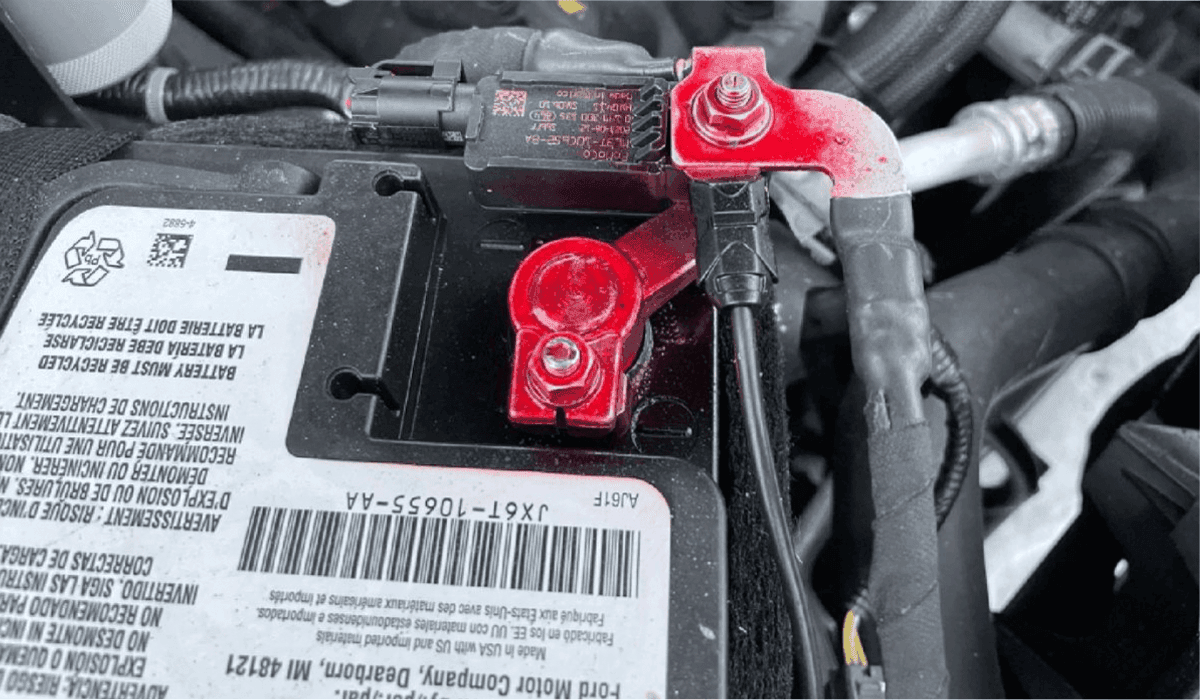
Replacing the battery in a Ford F-150 is one of the simplest yet most common maintenance tasks, whether you own a 2009–2014 (12th Gen), 2015–2020 (13th Gen), 2021–2025 (14th Gen), or even the new 2025+ models with PowerBoost hybrid or Lightning electric variants. The process is almost identical across gas, diesel, hybrid, and some EV-assisted models, but there are small differences depending on the year and trim (XL, XLT, Lariat, King Ranch, Platinum, Tremor, Raptor, etc.).
Tools and Parts You’ll Need
New battery (Group Size 65 is most common; H6/94R for many 2017+, H8 for some 3.5L EcoBoost and PowerBoost hybrids)
10 mm wrench (most years)
13 mm wrench (2009–2014 and some 2015–2017)
8 mm wrench or socket (negative terminal on many newer trucks)
Battery terminal puller or pliers (optional but helpful)
Wire brush or battery terminal cleaner
Anti-corrosion spray or felt washers
Gloves and safety glasses
Memory saver (OBD-II plug-in) – recommended for 2015+ to avoid radio/HVAC relearn
Locating the Battery in Different F-150 Generations
- 2004–2008 (11th Gen): Passenger side, front of engine bay
- 2009–2014 (12th Gen): Passenger side, easy access
- 2015–2020 (13th Gen): Still passenger side, but plastic cover + hold-down changed
- 2021–2025 Gas/Diesel: Passenger side, larger tray for H8 batteries on some PowerBoost
- 2021–2025 F-150 Lightning: No 12V battery replacement needed by owner (sealed AGM serviced by dealer)
- 2021–2025 PowerBoost Hybrid: Two batteries – main 12V under hood + auxiliary AGM behind passenger kick panel (most owners only replace the main one)
Step-by-Step Battery Replacement (Works for 95% of Gas & Diesel F-150s)
1. Park on level ground, turn off engine, remove keys, wait 10–15 minutes (important on 2018+ for BMS reset).
2. Open the hood.
3. Locate the battery (almost always right front corner).
4. Remove the plastic beauty cover if present (2015+).
5. Disconnect the negative (-) terminal first – always! (10 mm on most, 8 mm on 2021+).
6. Disconnect the positive (+) terminal.
7. Remove the hold-down wedge or bar:
- 2009–2014: 13 mm bolt on front of tray
- 2015–2020: Plastic wedge – push center pin and pull
- 2021+: 10 mm bolt + J-hook
8. Lift the battery out (40–60 lbs – use the handle or grab from bottom).
9. Clean the tray with baking soda/water mix if corroded.
10. Install new battery (make sure terminals face the correct direction – usually toward rear).
11. Reinstall hold-down securely.
12. Connect positive (+) first, then negative (-).
13. Apply anti-corrosion spray on terminals.
14. Start the truck – BMS (Battery Monitoring System) on 2011+ will auto-reset after a short drive.
Special Cases by Model Year and Engine
2011–2025 with Battery Monitoring System (BMS)
All EcoBoost, 5.0L, 6.2L, 3.5L PowerBoost, and 7.3L Godzilla engines have BMS. After replacement:
No manual reset needed on 2018+ – just drive 20–30 minutes
2011–2017 may require BMS reset with FORScan or dealer tool if you get “Battery Saver” messages
2021–2025 F-150 PowerBoost Hybrid
There are two 12V batteries:
- Main battery under hood (Group 65 or H8) – replace exactly like non-hybrid
- Auxiliary AGM battery (behind passenger side kick panel) – only replace if dash shows “Low Auxiliary Battery” warning
2017–2020 3.5L EcoBoost & 5.0L with Auto Start-Stop
These use AGM batteries (Group 94R-L or H7). You can install a regular flooded battery temporarily, but start-stop and some features may be disabled until an AGM is installed.
2022–2025 F-150 Lightning (Electric)
The 12V battery is sealed and not owner-serviceable. If the truck won’t power on, it needs dealer service.
Recommended Batteries by Year (Top Performing Options 2025)
Year | Engine | Best Flooded | Best AGM | Best Budget |
|---|---|---|---|---|
2009–2016 | All | Duralast Gold 65 | Odyssey Extreme ODX-AGM65 | EverStart Maxx |
2017–2020 | Non start-stop | Motorcraft Tested Tough MAX | Optima RedTop or YellowTop | Interstate MT-65 |
2017–2020 | With start-stop | – | Motorcraft AGM or DieHard Platinum | Walmart H6 AGM |
2021–2025 Gas/Diesel | Most | Duralast Platinum 65 | NorthStar NSB-AGM65, XS Power | Duracell Platinum |
2021–2025 PowerBoost | Main battery | – | Group H8/L5 AGM (Odyssey, NorthStar, FullRiver) | Antigravity H8/Group 49 |
Common Mistakes to Avoid
- Connecting negative terminal first (risk of sparks/explosion)
- Forgetting to tighten the hold-down (battery can bounce and short out)
- Using wrong group size (terminals won’t reach or battery will be loose)
- Skipping terminal cleaning (leads to hard starting in winter)
- Not waiting 10 minutes before disconnecting on 2018+ (can trigger BMS fault)
How Long Does an F-150 Battery Last?
Real-world data from owners (2024–2025):
- Southern states (AZ, TX, FL): 3–4 years
- Northern states (MN, MI, Canada): 4–6 years
- AGM batteries in start-stop trucks: 5–8 years
- PowerBoost hybrid main battery: 3–5 years (heavy electrical load)
Pro Tips from F-150 Mechanics
- Always buy batteries with at least 850 CCA (cold cranking amps) for diesel and northern climates
- Install felt anti-corrosion washers – cheap insurance
- If you live where temps drop below -20 °F, go AGM every time
- Costco Interstate, Walmart EverStart/Duracell Platinum, and O’Reilly Super Start Platinum are consistently the best value in 2025
That’s it – 10–20 minutes of work and your F-150 will crank like new again, whether it’s a 2010 work truck or a loaded 2025 Platinum PowerBoost.