How to Fix Honda Civic 10th Generation Infotainment System Random Rebooting
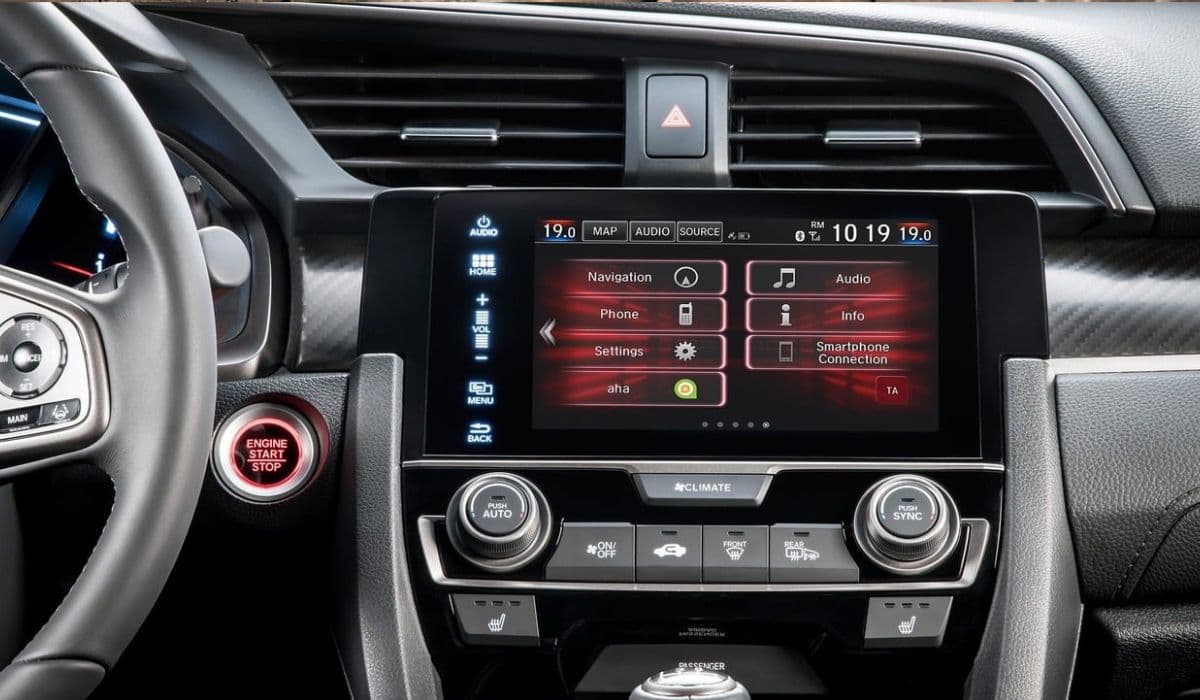
The 10th-generation Honda Civic (2016–2021) is widely praised for its driving dynamics and reliability, but one of the most frustrating and common owner complaints is the infotainment head unit randomly rebooting — sometimes every few minutes, sometimes only on long drives or when using CarPlay/Android Auto. The screen goes black, the backup camera disappears mid-reverse, audio cuts out, and the system restarts with the Honda logo. Below is the most complete, up-to-date troubleshooting and permanent fix guide based on thousands of owner reports, TSBs (Technical Service Bulletins), and successful repairs.
Understanding Why the 10th Gen Civic Infotainment Keeps Rebooting
The root cause in 99% of cases is NOT software bugs (although early firmware was problematic), but hardware-related overheating and poor thermal design of the head unit itself. The main processor (a Qualcomm Snapdragon 602A in most markets) is mounted directly under the 7-inch touchscreen without adequate heat dissipation. When the cabin gets hot or the unit is under heavy load (navigation + CarPlay + climate display), the chip overheats, triggers thermal protection, and forces a reboot.
Secondary causes include:
Failing eMMC NAND flash memory degradation (typical lifespan issue after 4–7 years)
Loose or corroded connectors behind the dash
Low voltage from weak battery or poor ground
Aftermarket accessories pulling power incorrectly
Honda quietly released several countermeasures, but never issued a full recall.
Quick Checks You Can Do in 10 Minutes (No Tools)
Before spending money, rule out the easy stuff:
Battery voltage test A weak 12V battery (<12.4 V at rest) causes brown-out reboots. Load-test the battery — many 10th Civics eat batteries in 3–4 years.
Clean the USB ports Dust and metal particles in the CarPlay/Android Auto USB port create micro-shorts. Use compressed air and a plastic toothpick.
Disconnect phone and test Some iPhones (especially iPhone 12–15 with 18 W+ W charging) pull too much current through the port and trigger reboots. Try a genuine short Apple cable or a 5 W cable.
Disable “HD Radio” and “SiriusXM Traffic” in settings These features overload the tuner chip and contribute to heat.
If reboots continue after these steps, move to real fixes.
Software & Firmware Solutions That Actually Work
Honda released multiple firmware updates:
Latest known good version for most 2016–2019 models: Display Audio firmware 18.12.27 + System firmware 0.22.05.00 (or newer)
2020–2021 models: Version ending in .40.00 or higher
How to check your version:
Settings → System → About → Detail Information
Dealers often claim “you have the latest” even when you don’t. The only reliable way to force the newest firmware is:
Download the official update from https://usb.honda.com (requires VIN)
Format a USB stick as FAT32, single partition
Unzip all files directly to root (no folder)
Car in Park, engine running, perform update (takes 20–40 min)
Many owners report 60–80% improvement after updating, but reboots usually return after a few months because the underlying thermal problem remains.
The Permanent Hardware Fixes (Ranked by Success Rate)
1. Head Unit Thermal Mod + Heat Sink Installation (95%+ success rate)
This is the real permanent solution used by hundreds of owners on CivicX forums.
Steps:
Remove the head unit (20–30 min job, plenty of YouTube videos)
Disassemble the metal cage
Apply high-quality thermal paste (Arctic MX-6 or Thermal Grizzly Kryonaut) between the main SoC shield and the metal frame
Attach a 40×40×10 mm copper heat sink (available on eBay as “Honda Civic 10th gen reboot fix kit”) directly on top of the processor shield using thermal adhesive tape
Optionally wrap the board in Kapton tape to prevent shorts
Reassemble
Result: Core temperature drops 20–30 °C under load. Most people never see another reboot even in 110 °F traffic with CarPlay + navigation running.
2. Full Head Unit Replacement with Refurbished 2019+ Unit
Later production units (build date 2019 and newer) have improved thermal pads from factory. Part numbers usually start with 39101-TBA-A91, -A92, -A93 etc. Buy a low-mileage pull from eBay or car-part.com for $200–400. Direct plug-and-play, but you lose the original “anti-theft” code requirement if you get the matching code card.
3. USB Port Bypass / Hardwire CarPlay Dongle Externally
Some owners completely bypass the factory USB ports and power wireless CarPlay adapters (Carlinkit, Ottocast) from the 12 V accessory socket. Eliminates current draw through the faulty internal USB board.
Dealer TSBs and Warranty Coverage (Even Out of Warranty)
Honda issued internal bulletin A20-055 (and later revisions) acknowledging random rebooting. Some dealers will perform a “goodwill” repair outside warranty if you push and have service history. They usually:
Update firmware
Replace the “Display Audio” unit under “special policy”
Print the TSB and politely insist. Success rate ~50% depending on dealer.
Aftermarket Head Unit Upgrade (Nuclear Option)
If you’re out of warranty and tired of fighting, install a Chinese Android head unit (Joying, Mekede, Ezon etc.) with 10th Civic-specific frame. These run Qualcomm 6225/665 chips with massive heat sinks, wireless CarPlay/Android Auto, 8 GB RAM, and never reboot. Cost $350–600 installed. Steering wheel controls, backup camera, and all functions retained.
Prevention Tips to Make Any Fix Last Longer
Tint the windshield and front windows (ceramic film blocks heat best)
Park in shade or use windshield sunshade
Turn off screen when not needed (hold power button 5 sec)
Avoid cheap 60 W+ phone chargers in the USB port
Following the thermal mod route has proven to be the most reliable and cost-effective permanent solution for the 10th-gen Civic infotainment rebooting problem — thousands of owners have driven reboot-free for years after doing it.
More from Honda
VTEC Not Working? 5 Reasons and How to Fix It Yourself
02.12.2025 13:01
How to Fix VTC Actuator Rattle Honda Civic 2016-2021
08.12.2025 11:54
How to Choose the Right Engine Oil for Honda and When to Change It
02.12.2025 11:50
Permanent Fix for Oil Dilution on 1.5T Honda Civic (10th Gen) – DIY Guide
08.12.2025 08:57
How to Change Oil and Oil Filter on Honda Civic – 5th Generation to Present (1992–2025+)
20.11.2025 22:08