Honda Accord distracting steering wheel controls complaints
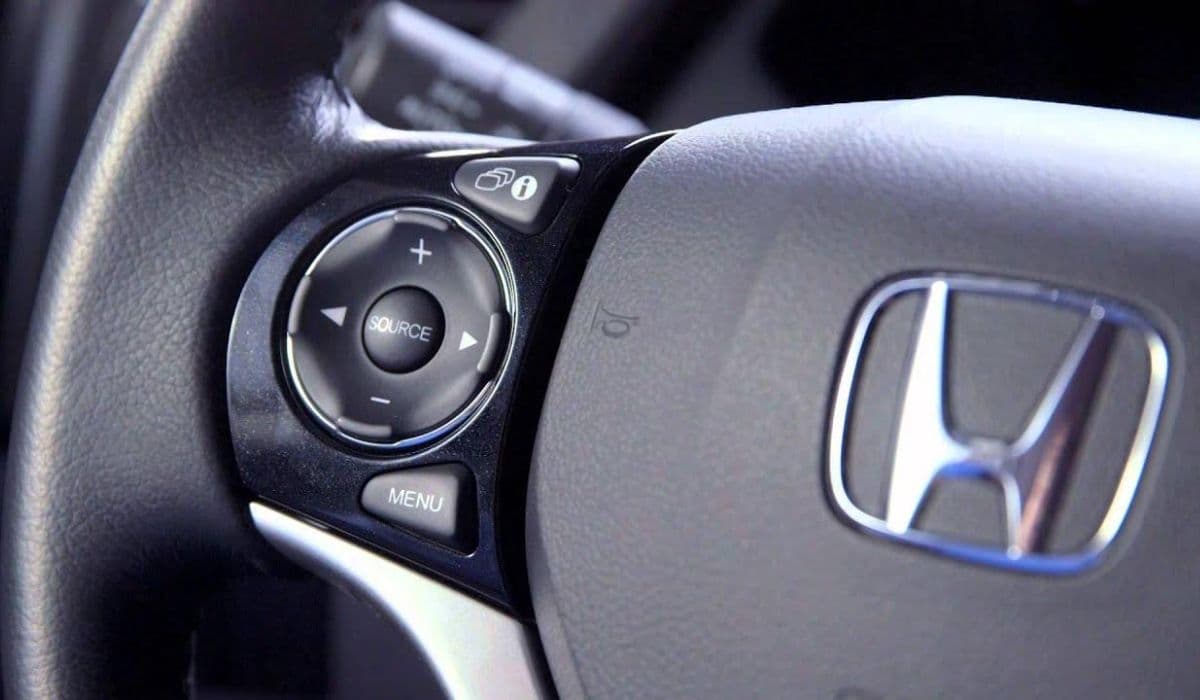
The Honda Accord has long been praised for its reliability, comfort, and smooth driving dynamics. However, one recurring issue that frustrates many owners revolves around the steering wheel controls. These buttons, designed to let drivers adjust audio volume, skip tracks, manage cruise control, and access other features without taking hands off the wheel, are meant to enhance safety by reducing distraction. Ironically, for a significant number of drivers, the design and functionality of these controls create more distraction than they prevent.
This article explores the most common complaints about distracting steering wheel controls in the Honda Accord, drawing from owner experiences across forums, review sites, and real-world usage. We'll break down the key problems, why they occur, and how they impact daily driving.
Common Complaints About Steering Wheel Controls
Owners frequently report that the steering wheel controls feel counterintuitive or overly sensitive, leading to unintended actions while driving. Here are the main issues:
Unresponsive or delayed buttons — Many drivers note that pressing a button for volume up or track skip requires deliberate force, yet the response lags or fails entirely. This forces repeated presses, pulling attention away from the road.
Accidental activations — The buttons are positioned close together, and slight movements of the thumb or palm can trigger the wrong function. For example, adjusting cruise control speed might accidentally change the radio station instead.
Lack of tactile feedback — Unlike traditional physical buttons with a clear click, some Accord models use smoother or flatter designs. Drivers often say they can't feel the press, leading to over-pressing or uncertainty.
Illumination problems — At night, buttons sometimes fail to light up properly or dim inconsistently, making it hard to locate the right control quickly.
Interference with other features — Controls for audio and driver assistance (like adaptive cruise) share space on the wheel, and switching between them can feel cluttered.
These issues are especially noticeable during highway driving, where quick adjustments are needed without losing focus.
How Steering Wheel Controls Contribute to Driver Distraction
Even though steering wheel controls are intended to minimize glances away from the road, their flaws can have the opposite effect. When a button doesn't respond immediately, drivers instinctively look down to confirm the press, defeating the purpose of hands-free operation. Similarly, accidental presses can trigger unexpected changes, such as sudden volume spikes or cruise control deactivation, requiring immediate correction.
In some cases, the layout feels overloaded. The left side handles audio and instrument cluster navigation, while the right side manages cruise control and adaptive features. This division works well in theory, but in practice, the buttons are small and closely spaced, increasing the chance of errors during turns or bumpy roads.
Specific Issues in Recent Honda Accord Models
Newer Accords feature more integrated digital interfaces, which amplify some of these problems:
Capacitive or touch-sensitive elements — A shift toward smoother, less mechanical buttons in higher trims leads to complaints about "mushy" feel and unreliable registration.
Integration with infotainment — Controls tied to the large touchscreen sometimes glitch, causing the system to ignore wheel inputs or respond erratically.
Driver attention monitoring — Some owners report that the system misinterprets loose grip or minor adjustments as inattention, triggering warnings that add to distraction.
These design choices aim for a cleaner, more modern look but sacrifice usability for some drivers.
Owner Experiences and Real-World Impact
Across online communities, owners share similar stories. One driver described repeatedly missing the volume button on a long trip, forcing multiple attempts that felt dangerous. Another noted that accidental cruise control changes during highway merging caused sudden speed drops, creating tense moments.
Many report that the controls feel like an afterthought compared to competitors, where buttons are larger, more spaced out, or offer better feedback. This leads to frustration, especially for those who rely on them daily for music or calls.
Potential Solutions and Workarounds
While permanent fixes depend on Honda's updates, owners have found ways to cope:
Use voice commands — Activating the built-in voice assistant for audio or navigation reduces the need for physical buttons.
Adjust grip habits — Keeping hands at the 9-and-3 position helps avoid accidental presses.
Customize settings — Some drivers remap functions or disable less-used controls to simplify the wheel.
Aftermarket accessories — Grip enhancers or button covers can improve tactile feel, though they aren't always ideal.
Why This Matters for Safety and Satisfaction
Distracting steering wheel controls undermine one of the Accord's core strengths: confident, low-stress driving. When drivers must focus on operating basic functions, it detracts from overall enjoyment and safety. Honda has refined these controls over generations, but persistent complaints suggest room for improvement in ergonomics and responsiveness.
For many, the Accord remains a top choice in its class. Addressing these steering wheel control frustrations could elevate it even further, making it truly distraction-free.
More from Honda
Earth Dreams 1.5T Carbon Buildup Fix: Complete Guide to Solving Honda’s Direct Injection Problem
08.12.2025 11:49
Best Used SUV Under $25,000: Honda CR-V vs Toyota RAV4 vs Ford Explorer
08.12.2025 15:32
Honda 1.5T vs Toyota 2.0 Dynamic Force – Which is Better?
08.12.2025 15:17
11th Gen Honda Civic Type R (FL5) Engine Changes: A Deep Dive into the Evolution of the K20C1
08.12.2025 08:08
2023+ Honda HR-V vs Previous Generation: In-Depth Engine and Powertrain Comparison
08.12.2025 08:03