Subaru infotainment screen freezing and fogging inside
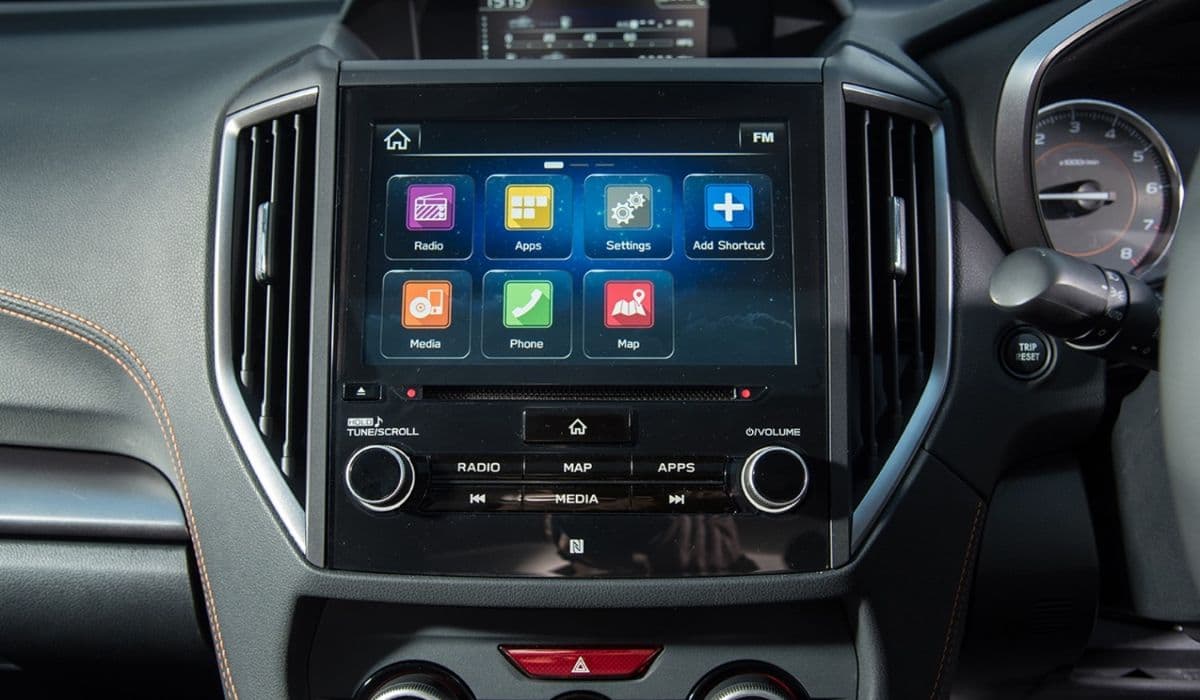
Subaru vehicles feature advanced infotainment systems that integrate navigation, audio controls, smartphone connectivity, and vehicle information displays. However, two persistent complaints stand out among owners: the screen freezing unexpectedly and internal fogging or condensation appearing behind the display. These issues disrupt daily driving, from adjusting music to using backup cameras safely. Understanding the root causes helps owners address them effectively and maintain a reliable experience.
Understanding Screen Freezing in Subaru Infotainment Systems
Freezing occurs when the touchscreen becomes unresponsive, often locking on a particular image like the startup logo, navigation map, or audio interface. Drivers report losing control over volume, climate settings, or even essential features like rear-view visibility.
Common triggers include software glitches in the operating system powering the unit. Overloaded processes from simultaneous tasks—such as Bluetooth streaming, navigation rerouting, and incoming calls—can overwhelm the hardware, leading to temporary lockups. Extreme cabin temperatures exacerbate the problem; rapid shifts from cold starts to warm interiors stress electronic components.
Hardware factors play a role too. The infotainment head unit, often manufactured by third-party suppliers, sometimes suffers from degraded touch digitizers or internal connections that fail over time. Intermittent power fluctuations or poor grounding in the vehicle's electrical system contribute to erratic behavior.
Many owners notice patterns: freezing happens more frequently during short trips with frequent engine starts, or when connecting smartphones via USB for Apple CarPlay or Android Auto. Compatibility mismatches between phone firmware and the car's software amplify these episodes.
Effective Troubleshooting Steps for Frozen Screens
Start with the simplest reset methods, which resolve most temporary freezes without tools.
Press and hold the power/volume knob for 10-15 seconds until the screen blanks and the Subaru or Starlink logo reappears. This performs a soft reboot, clearing temporary memory overloads.
For stubborn cases, turn off the engine, open the driver's door for a minute to fully power down electronics, then restart the vehicle. This deeper reset often clears lingering glitches.
Disconnect the negative battery terminal for 10-15 minutes to discharge residual power and force a full system refresh—ideal when other methods fail.
Check for software updates regularly through official channels, as manufacturers release patches addressing known bugs in connectivity and processing stability. Avoid over-the-air attempts if the screen is already unresponsive; use a USB drive method if available.
When freezes persist despite resets, inspect connections. Loose USB cables or damaged ports cause intermittent signals that confuse the system. Clean ports gently and test with different cables or devices.
Why Internal Fogging and Condensation Appear Behind the Screen
Fogging inside the infotainment screen manifests as hazy patches, bubbles, or moisture-like spots trapped between display layers. Unlike exterior window fog, this occurs within the sealed unit, often resembling delamination or trapped vapor.
Temperature fluctuations drive the issue: warm, humid cabin air enters microscopic gaps during use, then cools rapidly—especially overnight or in shaded parking—causing moisture to condense on cooler internal surfaces. Poor sealing around the display assembly allows ambient humidity ingress over time.
High cabin moisture sources accelerate the problem. Wet floor mats from rain or snow, damp clothing, or even breathing in a cold car introduce excess vapor. Some vehicles experience HVAC imbalances where the system fails to dehumidify cabin air effectively, pushing humid conditions toward electronics.
In certain cases, what appears as fogging stems from adhesive breakdown between screen layers rather than true moisture. Heat from prolonged display use or direct sunlight weakens bonds, creating visible separations that mimic condensation bubbles.
Practical Solutions to Address Internal Fogging
Immediate steps focus on reducing cabin humidity and gently drying the affected area.
Run the air conditioning with fresh air intake (not recirculation) to pull moisture from the cabin. Direct vents toward the dashboard to warm the unit gradually.
Park in a sunny, dry location with windows slightly cracked to promote airflow and evaporation of trapped moisture.
Use silica gel packs or moisture absorbers placed near the dashboard overnight to draw out ambient humidity.
For persistent fogging, professional inspection becomes necessary. Technicians can assess whether the unit requires resealing, layer replacement, or full head unit swap. Avoid DIY disassembly, as it risks damaging sensitive components or voiding coverage.
Preventive habits make a difference:
Remove wet items promptly and use all-weather mats that trap moisture.
Enable auto climate features that activate dehumidification during cold starts.
Keep the cabin ventilated during humid weather to equalize interior and exterior conditions.
Long-Term Prevention Strategies for Both Issues
Combine habits to minimize recurrence of freezing and fogging.
Maintain consistent software currency to patch vulnerabilities. Pair devices thoughtfully—limit simultaneous connections and update phone OS regularly for better compatibility.
Monitor cabin environment: use cabin air filters to reduce dust and pollen that trap moisture. Schedule HVAC system checks to ensure proper drainage and dehumidification performance.
Temperature management helps: avoid blasting heat directly on the dashboard after cold exposure, and use sunshades to prevent extreme interior heating.
For owners experiencing repeated problems, document episodes with timestamps, conditions, and symptoms. This information aids technicians in identifying patterns tied to specific hardware batches or software versions.
These challenges, while frustrating, often stem from solvable factors like software refinement and environmental control. Proactive steps restore functionality and enhance daily driving enjoyment in Subaru vehicles.
More from Subaru
Subaru SiriusXM aggressive ads covering screen irritating
22.01.2026 15:12
Subaru rear seat recline removal in newer models drawback
22.01.2026 10:06
Subaru vs competitors low maintenance costs win
22.01.2026 08:00
Subaru owner satisfaction high due to safety and AWD
21.01.2026 16:55
Subaru brake sensitivity and potential issues noted
21.01.2026 16:17