
How to fix autopilot camera blocked error after rain Tesla
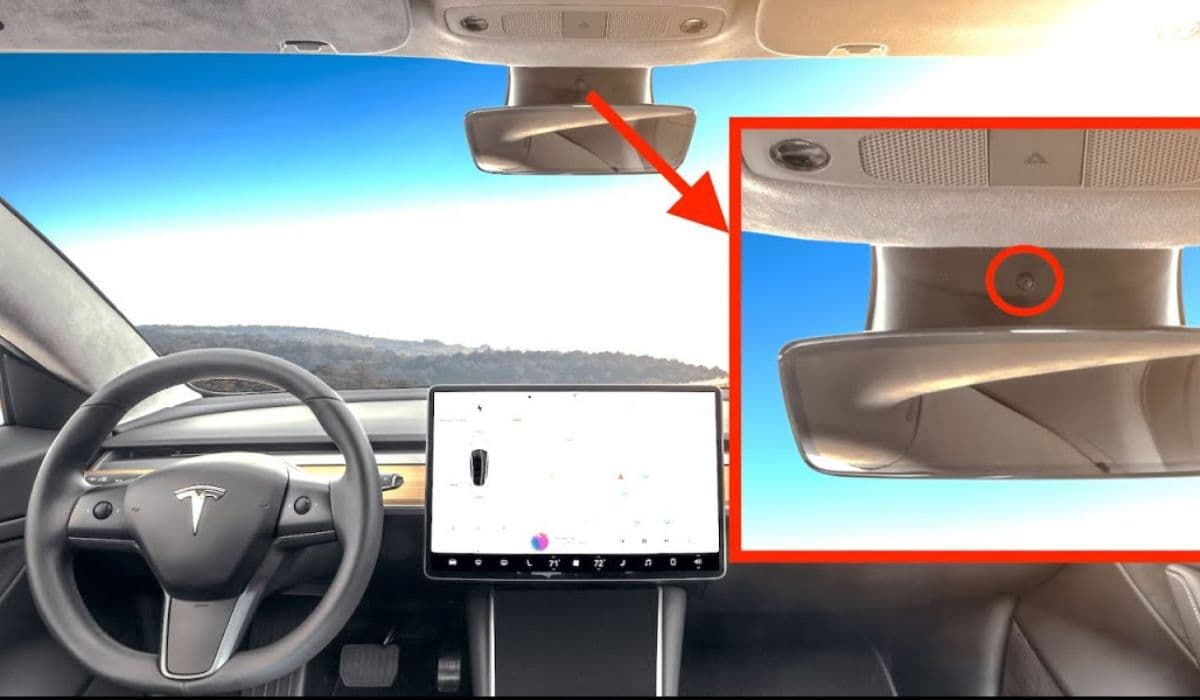
Tesla's Autopilot and Full Self-Driving systems rely heavily on a suite of cameras positioned around the vehicle to provide a clear view of the surroundings. When heavy rain hits, many owners encounter the frustrating "camera blocked or blinded" error, which temporarily disables key driver assistance features. This issue often persists even after the rain stops, as water droplets, residue, or internal condensation linger on the lenses. Understanding the root causes and applying targeted fixes can restore functionality quickly, allowing you to get back to enjoying seamless Autopilot performance.
Why Rain Triggers the Camera Blocked Error
Rain doesn't just splash water on the exterior— it creates multiple challenges for Tesla's vision-based system. The cameras, including the forward-facing trio behind the windshield, side repeaters in the fenders, pillar cameras, and rear view, are exposed to the elements. Here's what typically happens:
Water droplets accumulate directly on the lens surfaces, distorting the view.
Road spray and moisture lead to streaky residue that dries into a film.
Sudden temperature changes cause condensation inside the camera housings, especially in the pillar and fender units.
In low-light conditions combined with rain, reflections and glare exacerbate the blinding effect.
Tesla's owner's manual explicitly notes that environmental conditions like rain can limit camera visibility, triggering safety protocols that disable Autopilot until clear images are restored. This conservative approach prioritizes safety but can be inconvenient during commutes in wet weather.
Immediate Steps to Clear External Water and Debris
The quickest way to resolve a post-rain camera block is hands-on cleaning. Start with these safe methods before driving:
Use a soft microfiber cloth dampened with clean water to gently wipe each camera lens.
Focus on the forward cameras by cleaning the upper windshield area where they sit.
For side and rear cameras, inspect for stuck droplets and remove them carefully.
Avoid harsh chemicals or abrasive materials, as they can scratch the lenses or remove protective coatings.
Many owners find that driving at highway speeds helps naturally clear droplets through airflow, but for stubborn spots, a quick manual wipe is more effective. Regularly incorporating camera cleaning into your wash routine prevents buildup from escalating into persistent errors.
Addressing Persistent Condensation Issues
If the error lingers without visible external water, internal condensation is often the culprit. This forms when warm, humid air meets cooler surfaces inside the sealed camera housings after rain.
Park the vehicle in a dry, warm environment like a garage to allow moisture to evaporate naturally.
Run the climate control system on high heat with defrost mode to accelerate drying.
Precondition the cabin via the app before driving to equalize temperatures and reduce fogging.
In some cases, owners report that a simple drive cycle—starting and stopping the vehicle a few times—helps the system recognize cleared visibility. Patience is key here, as condensation usually resolves within hours or after a short trip.
Software Resets and Camera Recalibration
Occasionally, the error persists due to a software glitch rather than physical obstruction. Tesla's over-the-air updates continuously improve camera processing, but temporary hiccups can occur.
Perform a soft reset by holding both scroll wheels on the steering yoke until the screen reboots.
For deeper issues, access the service menu and clear camera calibration, then drive on well-marked roads to allow recalibration.
Check for pending software updates, as many releases specifically enhance wet-weather camera performance.
These steps often restore full functionality without needing professional intervention, especially if the error appeared suddenly after rain.
Preventive Measures for Rain-Prone Driving
Proactive habits can minimize how often you encounter this error in wet conditions:
Apply a hydrophobic treatment to exterior camera lenses to repel water and reduce droplet adhesion.
Keep wipers in top condition, as they indirectly help clear spray affecting forward cameras.
Avoid parking outdoors during storms if possible, to limit exposure to sudden cooling.
Monitor the vehicle's camera preview in the service menu regularly to spot early haze or residue.
By building these into your routine, you'll notice fewer interruptions, even during prolonged rainy seasons. Tesla continues to refine its vision system through software, making it increasingly resilient to real-world weather challenges.
When to Seek Professional Assistance
While most post-rain camera blocks are temporary and owner-resolvable, persistent problems may indicate deeper issues like faulty seals allowing ongoing moisture ingress or wiring faults.
If the error affects the same camera repeatedly despite cleaning and drying.
When accompanied by blank feeds in the camera preview.
If recalibration fails to complete after extended driving.
Scheduling a mobile service appointment through the app allows technicians to diagnose and reseal housings if needed. Tesla's warranty covers genuine hardware defects, ensuring reliable long-term performance.
Mastering these fixes empowers Tesla owners to handle one of the most common weather-related frustrations confidently. With clear cameras, Autopilot delivers its full potential, making every drive safer and more enjoyable, rain or shine.
More from Tesla

How to fix FSD visualization lag after Tesla 2025.14 update
16.12.2025 07:02
How to replace Tesla Model 3/Y rear bumper clips (easy DIY)
16.12.2025 05:46
How to fix phantom drain overnight Tesla
16.12.2025 04:50
How to replace octopus coolant leak (Tesla Model 3 2017–2020)
16.12.2025 03:21
How to replace torn rear seat bolsters Tesla
16.12.2025 03:09