
How to fix door handle not presenting (Tesla Model S/X refresh)
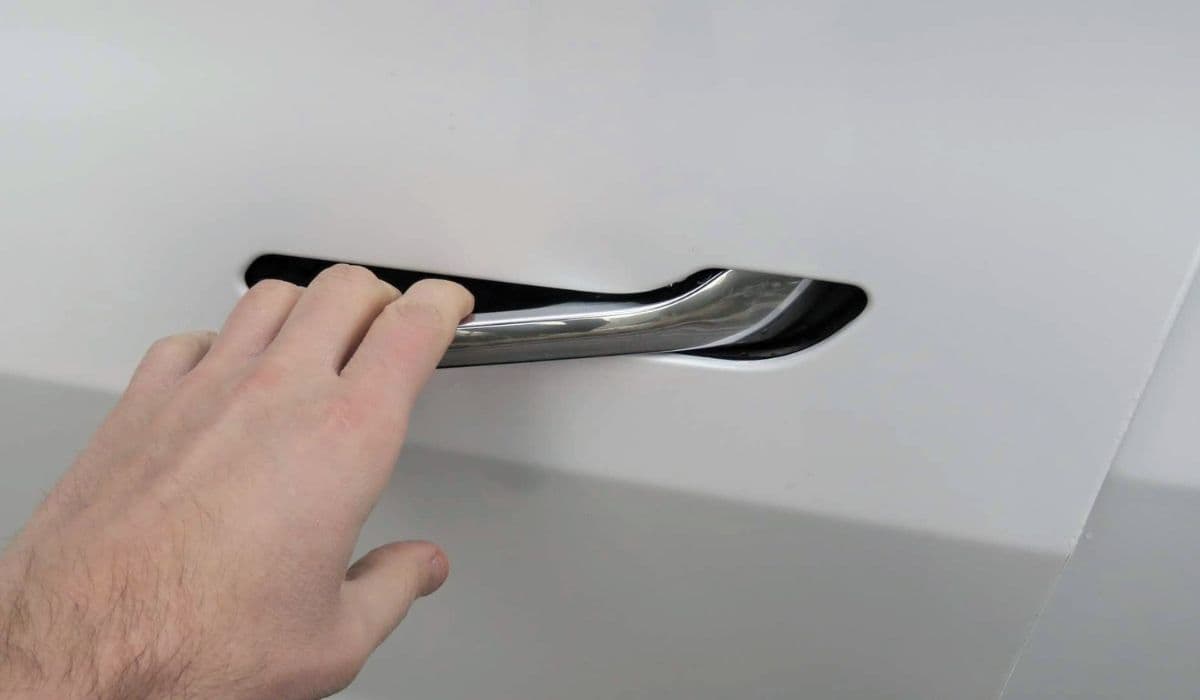
The refreshed Tesla Model S and Model X feature sleek flush-mounted door handles that automatically extend—or "present"—when you approach the vehicle with the key fob or phone key. This design enhances aerodynamics and gives the cars their signature futuristic look. However, owners sometimes encounter an issue where one or more handles fail to present, remaining flush with the door and making entry frustrating. While earlier models had more frequent mechanical failures, the refresh versions benefit from improved hardware, yet glitches and minor faults can still occur.
Understanding why this happens and how to address it can save time and restore seamless access. The problem often stems from software quirks, sensor misreads, or temporary electronic hiccups rather than outright hardware breakdown in these newer designs.
Understanding the Flush Door Handle System in Refreshed Models
In the refreshed Model S and Model X, the door handles are fully integrated and motorized for both extension and retraction. They rely on a combination of proximity sensors, Bluetooth detection from your phone key or fob, and onboard controllers to decide when to present.
Unlike older retractable handles that used paddle gears and microswitches prone to wear, the refresh system is more robust and electronically driven. The handles extend smoothly upon detecting an authenticated key nearby, and they retract after a period of inactivity or when the vehicle drives off.
Common triggers for non-presenting include:
Software communication delays between the body controller and handle motors.
Low 12V battery voltage affecting electronic modules.
Temporary sensor confusion from environmental factors like extreme cold or interference.
Calibration drift over time.
Fortunately, many cases resolve without tools or service visits, thanks to built-in diagnostic and reset features.
Quick Troubleshooting Steps to Try First
Start with the simplest non-invasive methods. These often resolve intermittent issues caused by software glitches or temporary faults.
Perform a full vehicle reboot: Sit in the driver's seat, press and hold both scroll wheels on the steering wheel until the screen goes black (about 10-15 seconds). Release and wait for the system to restart. This clears cached errors and refreshes connections to the door modules.
Power cycle the car: From the touchscreen, go to Controls > Safety > Power Off. Wait at least two minutes without touching anything, then press the brake pedal to wake the vehicle. This deeper reset can clear stubborn electronic hangs.
Check phone key settings: Ensure your phone's Bluetooth is on, location services are enabled for the Tesla app, and the phone is set as a key. Walk away from the car for a minute, then approach again to test presentation.
Manually trigger presentation: Firmly press the wide end of the flush handle (the rear portion for front doors). It should pop out slightly, allowing you to pull it fully and open the door. Once extended, push it back in gently to see if it resets the mechanism.
These steps work surprisingly often for refresh models, as the system is heavily software-dependent.
Using Built-In Door Handle Calibration
One of the most effective fixes for refreshed Tesla Model S and X is the onboard calibration tool, introduced in later software versions.
To access it:
Tap the car icon on the touchscreen to open Controls.
Navigate to Service > Door Handles or search for "handles" in the search bar.
If available, select the affected handle (it may appear highlighted) and follow the on-screen prompts to recalibrate.
The process involves the handle extending and retracting several times while the system learns optimal positioning and timing. It's quick and can resolve issues where the handle is sluggish or fails to present reliably.
If the calibration option isn't visible, ensure your vehicle is on the latest software update—over-the-air updates frequently include refinements to handle operation.
Manual Entry Methods When Handles Won't Present
If the handle refuses to extend automatically, you can still access the vehicle without damage.
Press firmly on the outer edge of the handle (the part closest to the rear of the door). This manually overrides the flush position in refresh models, allowing the handle to pop out enough to grip and pull.
Once inside, use the interior door open button or mechanical release to exit normally.
For rear doors on Model X, the process is similar—press the flush surface to trigger manual extension.
Avoid forcing the handle excessively, as the mechanism is designed to yield safely.
Preventive Maintenance for Reliable Handle Operation
Keeping the system in top shape reduces the chances of non-presenting issues recurring.
Regularly clean around the handle edges with a soft microfiber cloth to remove dirt or debris that could interfere with sensors.
Monitor 12V battery health via the service menu—low voltage can cause erratic behavior in accessory systems like handles.
Enable walk-up unlock in settings for more consistent presentation.
In cold weather, precondition the cabin via the app before approaching, as this warms electronic components.
Consistent software updates also bring ongoing improvements to handle logic and reliability.
When to Seek Professional Assistance
While many non-presenting problems in refreshed models are software-related and DIY-fixable, persistent issues across multiple handles or accompanied by error messages may indicate a deeper fault, such as a controller module or wiring concern.
Schedule a mobile service appointment through the Tesla app for diagnostics. Technicians can run advanced tests and recalibrate or replace components if needed. In most cases, especially under warranty, this restores perfect operation.
By methodically working through resets, calibration, and basic checks, most owners regain flawless handle presentation without hassle.
More from Tesla
How to fix HVAC blend door actuator clicking noise Tesla
16.12.2025 13:16
How to fix FSD visualization lag after Tesla 2025.14 update
16.12.2025 07:02
How to fix phantom drain overnight Tesla
16.12.2025 04:50
How to replace octopus coolant leak (Tesla Model 3 2017–2020)
16.12.2025 03:21
How to replace torn rear seat bolsters Tesla
16.12.2025 03:09