
How to fix half-shaft click noise when accelerating Tesla
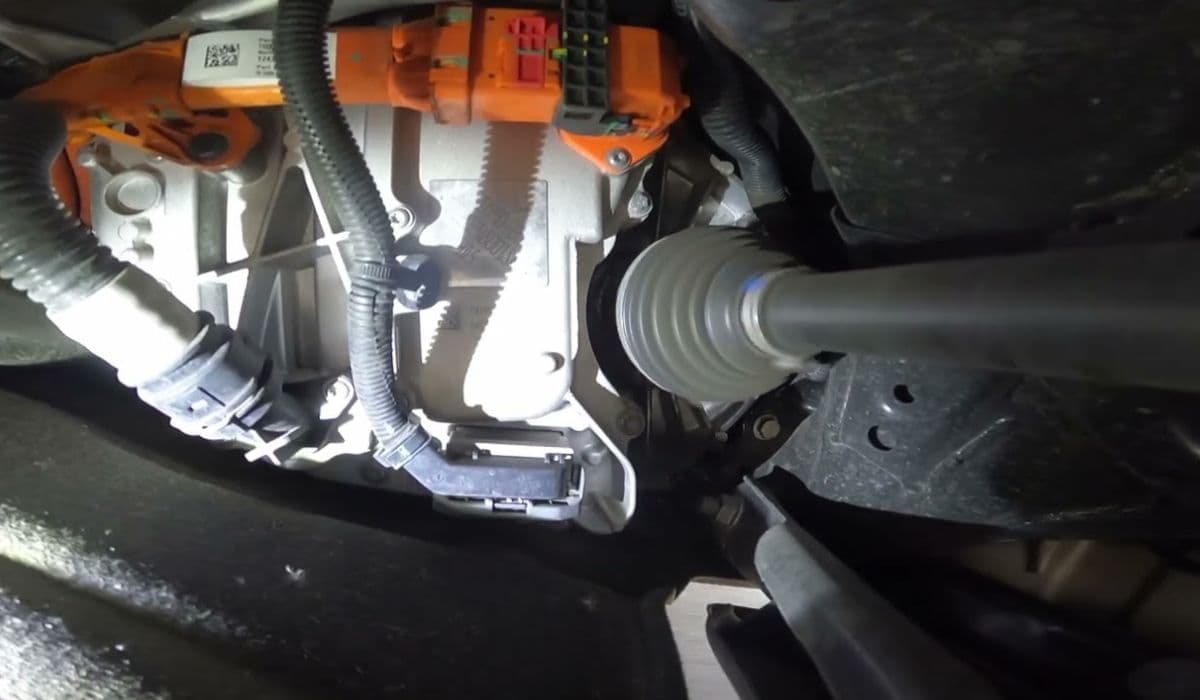
Tesla vehicles, known for their instant torque and silent operation, can sometimes develop an annoying clicking or clunking noise during acceleration. This issue often stems from the half-shafts (also called drive axles or CV axles), which transmit power from the electric motors to the wheels. The distinctive click, usually heard at low speeds when starting from a stop or during light throttle application, is a common complaint among owners of dual-motor models across various Tesla lineups.
The noise typically occurs due to minor play or friction at the interface where the half-shaft splines meet the wheel hub. High torque loads from the electric drive units can exacerbate this over time, leading to slight movement that produces the audible click. It's more noticeable in quieter electric vehicles compared to traditional cars where engine noise masks such sounds.
Understanding the Half-Shaft Clicking Issue
Half-shafts in Tesla models feature constant velocity (CV) joints that allow smooth power delivery while the wheels turn and move up and down with the suspension. In dual-motor configurations, both front and rear half-shafts handle significant stress from rapid acceleration.
The click often happens during torque direction changes, such as transitioning from coasting to accelerating or during regenerative braking.
It's usually a single or series of short clicks from one or more wheels, most prominent at low speeds.
Factors like cold weather, high mileage, or aggressive driving can make it more apparent.
Unlike worn CV joints in traditional vehicles that click repetitively while turning, this Tesla-specific issue is tied to the spline-to-hub connection under torque load.
Many owners report the noise starting subtly and becoming more consistent, but it rarely indicates immediate failure—it's more of an irritation than a safety concern.
Diagnosing the Clicking Noise Yourself
Before heading to a service center, confirm if the half-shaft is the culprit. Proper diagnosis saves time and ensures the right fix.
Drive with windows down in a quiet area: Accelerate gently from a stop and listen for clicks near the wheels.
Test during deceleration: Ease off the accelerator or use light regen to see if the noise repeats when torque reverses.
Check for patterns: Note if it's from front or rear, one side or both, and whether it worsens when cold or after parking.
Rule out other sources: Inspect for loose brake components, suspension parts, or debris in wheels, though these usually produce different sounds.
If the click aligns with torque application and originates from the wheel areas, half-shaft involvement is likely.
Common Professional Fixes for Half-Shaft Click
Tesla service technicians frequently address this with straightforward procedures that restore smooth operation.
Cleaning and lubricating the spline interface: Removes contaminants and reduces friction causing the click.
Retorquing the axle nuts: Ensures proper clamping force to minimize play.
Installing new axle nuts and washers: Fresh parts provide better grip and prevent loosening.
In persistent cases: Full half-shaft replacement if wear is advanced.
These steps often resolve the issue effectively, with many owners reporting silence returning after service.
DIY Approach to Resolving the Noise
Experienced owners sometimes tackle this at home, as the process involves basic tools and caution.
Safely jack the vehicle and secure it on stands.
Remove wheels to access axle nuts.
Loosen and remove the large central axle nut (requires high-torque tools).
Separate the half-shaft slightly from the hub.
Clean splines thoroughly and apply suitable high-temperature grease.
Reassemble with new hardware and torque to specifications.
This method has helped numerous owners eliminate the click temporarily or long-term, though professional service is recommended for warranty preservation.
Preventing Future Half-Shaft Clicking
While not always avoidable due to the design's high-torque nature, certain habits can delay onset.
Avoid excessive hard launches unless necessary.
Maintain moderate driving in varied conditions.
Monitor for early signs and address promptly.
Regular inspections during tire rotations can catch loosening early.
Tesla's engineering continues to refine components, but proactive care keeps the drive enjoyable.
When to Seek Tesla Service Assistance
If the noise persists or worsens, schedule a service appointment via the app.
Describe symptoms accurately, including when it occurs and from which side.
Request a test drive with a technician to replicate the issue.
Reference common half-shaft procedures if needed.
Most fixes are quick, often completed in a few hours, restoring the serene acceleration Tesla owners expect.
More from Tesla

How to fix FSD visualization lag after Tesla 2025.14 update
16.12.2025 07:02
How to replace Tesla Model 3/Y rear bumper clips (easy DIY)
16.12.2025 05:46
How to fix phantom drain overnight Tesla
16.12.2025 04:50
How to replace octopus coolant leak (Tesla Model 3 2017–2020)
16.12.2025 03:21
How to replace torn rear seat bolsters Tesla
16.12.2025 03:09