How to fix wiper motor failure (Tesla Cybertruck)
The Tesla Cybertruck's innovative design extends to its windshield wiper system, featuring a single oversized blade powered by a robust motor. However, like any advanced vehicle component, the wiper motor can encounter failures that disrupt visibility during inclement weather. Addressing these issues promptly ensures safety and maintains the truck's performance. This guide delves into diagnosing and repairing wiper motor problems, drawing from common experiences reported by owners and technical insights.
Recognizing Signs of Wiper Motor Problems
Identifying wiper motor failure early can prevent more extensive damage or hazardous driving conditions. One of the most noticeable symptoms is the wipers failing to activate altogether when you toggle the control stalk or use the touchscreen interface. In some cases, the wipers might start but operate erratically, such as moving at inconsistent speeds or stopping midway across the windshield.
Owners have reported unusual noises emanating from the motor area, like grinding, whining, or clicking sounds, which indicate internal wear or electrical faults. Another red flag is the wipers functioning only on certain speed settings—perhaps intermittent mode works, but continuous high-speed does not. If the auto-wiper feature, which relies on rain sensors integrated with the Autopilot cameras, fails to engage despite visible precipitation, the motor could be at fault.
Dashboard warnings may appear, such as a "Wiper System Fault" alert on the central display. This notification often accompanies reduced functionality and might log error codes in the vehicle's diagnostic system. Additionally, if the wipers leave streaks or fail to clear water effectively due to insufficient torque from the motor, it's worth investigating. These symptoms can stem from mechanical, electrical, or software-related issues unique to the Cybertruck's 48-volt architecture.
Underlying Reasons for Wiper Motor Malfunctions
Understanding the root causes of wiper motor failure in the Tesla Cybertruck helps in targeted troubleshooting. A primary culprit is a faulty gate driver component within the motor controller, which has led to widespread recalls. This electronic defect can cause the motor to overheat or lose power regulation, resulting in complete shutdowns.
Mechanical wear is another factor, especially in regions with harsh weather. The single large wiper blade exerts significant stress on the motor, and exposure to debris, ice, or extreme temperatures can accelerate degradation. Loose connections, such as a nut on the wiper arm becoming dislodged, have been reported by owners as a simple yet common issue that mimics motor failure.
Electrical problems, including corroded wiring or issues with the 48-volt power supply, can interrupt the motor's operation. The Cybertruck's integration with advanced driver-assistance systems means software glitches or outdated firmware might miscommunicate with the motor, causing intermittent failures. Overloading from stuck blades—due to frozen wipers or heavy snow buildup—can burn out the motor windings.
Environmental factors play a role too; salt from road treatments in wintery areas can corrode components, while dust in arid climates might infiltrate seals. Manufacturing variances in early production models have also contributed to higher failure rates, prompting Tesla to issue service bulletins for motor replacements.
Essential Safety Measures
Before attempting any repairs on your Tesla Cybertruck's wiper motor, prioritize safety to avoid injury or further vehicle damage. Always park the truck on a level surface and engage the parking brake. Disconnect the low-voltage battery (the 12-volt accessory battery) to prevent accidental electrical shorts, as the wiper system ties into the high-voltage network.
Wear protective gear, including insulated gloves and safety glasses, especially when handling electrical components. Ensure the vehicle is in Service Mode via the touchscreen to disable automated systems that could activate unexpectedly. If working in wet conditions, dry the area thoroughly to minimize shock risks.
Consult your owner's manual for model-specific warnings, and note that tampering with certain components might void warranty coverage. If you're not experienced with automotive electronics, consider professional assistance to avoid complicating issues. Finally, test the wipers in a controlled environment post-repair to confirm safe operation.
Required Tools and Parts
Gathering the right tools and parts streamlines the repair process for Tesla Cybertruck wiper motor issues. Basic hand tools include a socket set with extensions (particularly 10mm and 13mm sockets for accessing bolts), torque wrench for precise tightening, and pliers for handling clips and wires.
For diagnostics, a multimeter is essential to check voltage and continuity in the wiring harness. An OBD-II scanner compatible with Tesla's CAN bus system can read error codes from the vehicle's ECU. If replacement is needed, source a genuine Tesla wiper motor assembly, part number often referenced in service manuals as compatible with the Cybertruck's unique setup.
Additional materials might include dielectric grease for electrical connections, thread locker for securing nuts, and weatherproof sealant for any exposed areas. A trim removal tool set helps avoid damaging the exoskeleton panels when accessing the motor compartment. For software-related fixes, ensure you have a stable Wi-Fi connection for over-the-air updates.
Diagnostic Techniques
Thorough diagnostics are key to pinpointing wiper motor failure in the Tesla Cybertruck. Start by entering Service Mode on the touchscreen: navigate to Controls > Software > Service Mode, and input the access code if prompted. From there, access the Wiper Test routine under Closures > Windows > Wiper Test, and run it to observe motor behavior.
Inspect visually for obvious issues like loose wiper arm attachments or debris obstructing movement. Use the multimeter to measure voltage at the motor connector—expect around 48 volts during activation. Check for continuity in the wiring from the motor to the body control module.
Scan for diagnostic trouble codes (DTCs) using a Tesla-approved tool; codes like P0571 (wiper motor circuit) can indicate specific faults. Test the rain sensor by simulating precipitation with a water spray and monitoring response. If the motor hums but doesn't move, it could signal seized linkages. Document all findings to guide repairs or inform Tesla service.
Simple Fixes for Common Issues
Not all wiper motor problems in the Tesla Cybertruck require full replacement; some can be resolved with straightforward adjustments. A frequent issue is a loose nut on the wiper arm base, which can cause the blade to slip or fail to move. To fix this, remove the cap covering the nut, tighten it to the specified torque (typically 20-25 Nm), and reinstall the cap.
Clean the motor area of any accumulated dirt or corrosion using a soft brush and electrical contact cleaner. Reset the system by powering off the vehicle completely—hold the brake pedal while pressing both scroll wheels on the steering yoke until the screen reboots. This can clear temporary software glitches.
If the wipers are frozen, gently free them without forcing the motor, then apply a de-icer. For intermittent operation, inspect and reseat electrical connectors under the frunk. These quick interventions have resolved issues for many owners without needing deeper intervention.
Performing a Wiper Motor Replacement
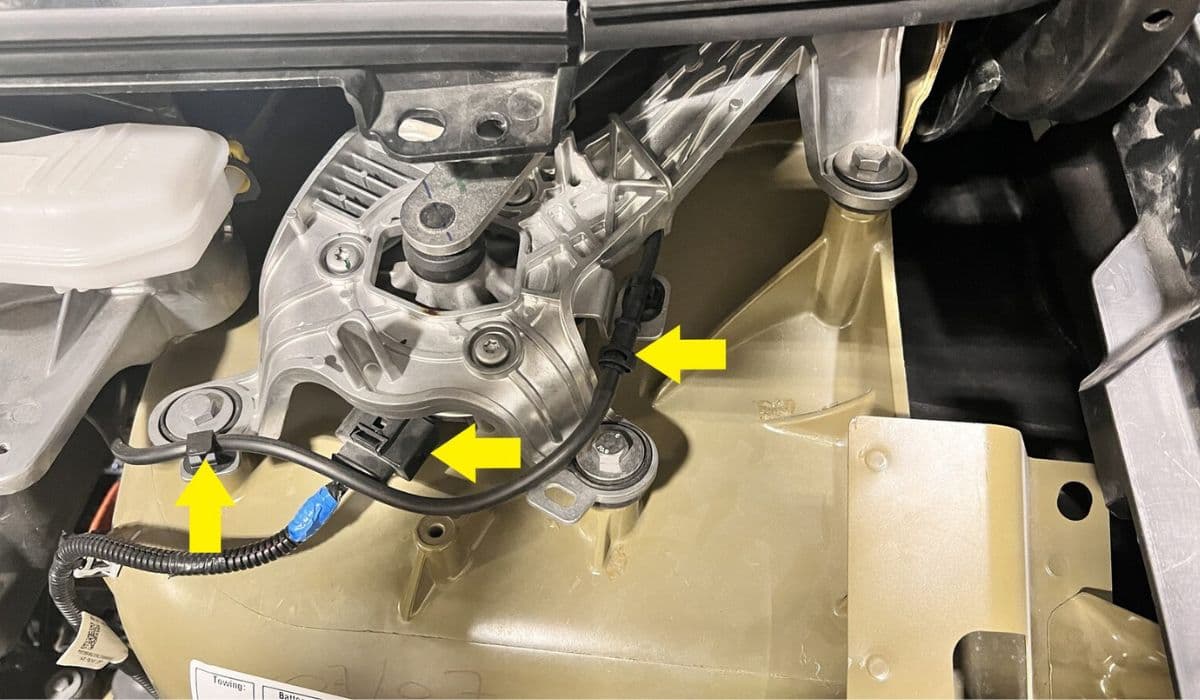
Replacing the wiper motor in a Tesla Cybertruck involves careful disassembly, best suited for those with mechanical experience. Begin by removing the frunk liner and any obstructing panels using trim tools. Disconnect the battery and locate the motor assembly beneath the windshield base.
Unbolt the motor mounting brackets (usually three bolts) and detach the wiring harness. Remove the linkage arm by loosening the pivot nut, taking note of its position for reassembly. Install the new motor by reversing these steps, ensuring all connections are secure and applying thread locker where needed.
Torque all fasteners to Tesla specifications to prevent vibrations. After installation, run the Wiper Test in Service Mode to calibrate and verify operation. This process addresses recall-related faults where the original motor's controller fails.
Software Troubleshooting and Updates
The Cybertruck's wiper system is deeply integrated with software, so troubleshooting often involves digital fixes. Check for pending over-the-air (OTA) updates via the Software menu; installations like those addressing motor controller bugs can resolve failures without hardware changes.
Perform a soft reset by navigating to Controls > Safety > Power Off, waiting two minutes, then restarting. For persistent issues, use the Tesla app to request a diagnostic report, which might reveal firmware incompatibilities. In some cases, recalibrating the Autopilot cameras—linked to auto-wiper functionality—via Service Mode can restore performance.
Monitor release notes for updates targeting wiper reliability, as Tesla frequently refines software based on fleet data.
Professional Assistance Options
When DIY efforts fall short, turning to authorized professionals ensures proper resolution for Cybertruck wiper motor failures. Schedule a service appointment through the Tesla app, providing details of symptoms and any DTCs for efficient diagnosis.
Tesla Service Centers offer mobile service for minor issues like loose components, but motor replacements typically require a visit. Under warranty or recall programs, repairs are often covered at no cost, including the 2024 recall for faulty motors affecting thousands of units.
Third-party specialists familiar with EVs can assist, but verify their expertise with Tesla systems to avoid complications. Always request a detailed service report post-repair for records.
Maintenance Tips to Avoid Future Failures
Proactive maintenance extends the life of your Tesla Cybertruck's wiper motor. Regularly inspect the wiper blade for wear and replace it every six months or after 10,000 miles, ensuring it's the oversized type designed for the Cybertruck.
Keep the windshield clean to reduce motor strain, and avoid operating wipers on a dry surface. In cold climates, lift the wiper arm before freezing weather to prevent ice adhesion. Apply silicone lubricant to linkages annually to maintain smooth operation.
Schedule routine software updates and monitor for service bulletins. Park in shaded areas to minimize heat exposure on electrical components. These habits mitigate common stressors, promoting reliable performance over the vehicle's lifespan.
More from Tesla

How to fix HVAC blend door actuator clicking noise Tesla
16.12.2025 16:16
How to fix FSD visualization lag after Tesla 2025.14 update
16.12.2025 10:02
How to fix phantom drain overnight Tesla
16.12.2025 07:50
How to replace octopus coolant leak (Tesla Model 3 2017–2020)
16.12.2025 06:21
How to replace torn rear seat bolsters Tesla
16.12.2025 06:09