
How to replace 12V battery and reset alerts (Tesla 2025 models)
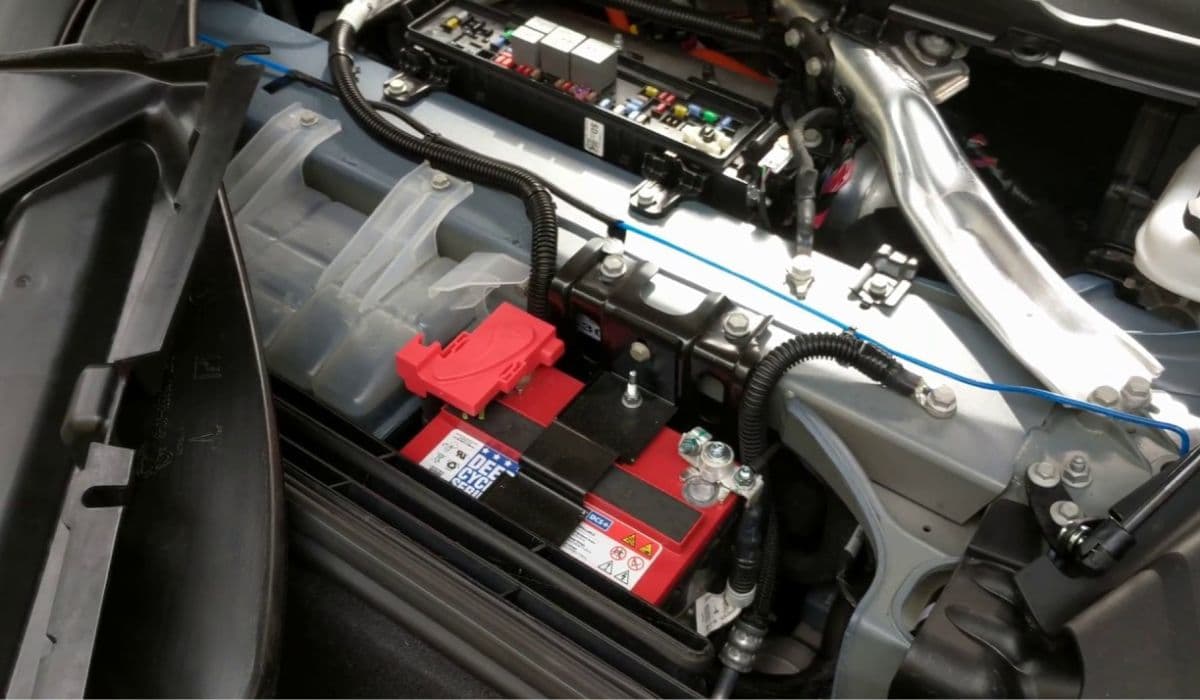
The 12V battery in Tesla vehicles plays a critical role beyond just powering accessories. It supports the vehicle's electronics, enables wake-up functions, and ensures smooth operation of systems like door handles, lighting, and the touchscreen. In newer models, including refreshed designs with advanced software integration, the low-voltage system has evolved to include lithium-ion options in some configurations, offering better longevity and efficiency compared to traditional lead-acid types. Replacing the 12V battery properly is essential to avoid persistent warnings or system glitches, as the car's computer closely monitors voltage and health metrics.
Understanding when replacement is needed can save hassle. Tesla's onboard diagnostics often display alerts like "Low Voltage Battery Needs Service" or "Electrical System Backup Power Reduced" well in advance. These notifications appear based on internal resistance, charge cycles, and performance data. Ignoring them risks unexpected shutdowns of non-essential features or difficulty accessing the vehicle.
Preparing for 12V Battery Replacement
Safety comes first when working on any vehicle component. Park on a flat surface, engage Park, and ensure the high-voltage system is isolated if following full procedures.
Gather tools: 10mm socket wrench, torque wrench, gloves, and safety glasses.
Verify battery type via the touchscreen: Go to Controls > Software > Additional Vehicle Information to confirm if it's lead-acid or lithium-ion.
Charge the new battery fully beforehand if possible, as the vehicle may perform an initialization cycle post-installation.
Lower all windows and prop a door open to prevent lockout during power disconnection.
Many owners opt for OEM replacements to maintain compatibility, as aftermarket options sometimes trigger recurring alerts due to slight differences in voltage curves or internal resistance.
Step-by-Step Replacement Process
The location and access vary slightly by model, but recent designs place the battery in the frunk area for easier reach.
Open the frunk and remove any covers or aprons shielding the battery compartment.
Disconnect the vent tube if present (common on lead-acid types).
Loosen the negative terminal first to minimize sparking risk, followed by the positive.
Remove hold-down brackets or straps securing the battery.
Carefully lift out the old battery—it's heavier in lead-acid variants—and inspect for corrosion or leaks.
Installing the new one reverses the process:
Position the battery securely.
Reconnect positive first, then negative, torquing to specifications (typically 5-6 Nm).
Reattach any vents or covers.
Close the frunk gently.
For models with lithium-ion low-voltage batteries, the process is similar but often simpler due to lighter weight and no venting requirements. Always check that the battery temperature is moderate before starting, as extreme heat can affect performance.
Common Challenges During Replacement
One frequent issue is accessing the first responder loop or pyro fuse, which fully depowers the vehicle. In some procedures, disconnecting this ensures the system registers the new battery correctly. Skipping full power isolation can leave the computer "awake," preventing proper charging of the new unit or clearing of old faults.
Another challenge arises with battery type mismatches. Switching between brands or chemistries without updating configurations can cause the vehicle to flag inconsistencies. Recent software versions handle transitions better, but always verify compatibility.
Resetting Alerts After Battery Replacement
Alerts don't always clear immediately, as the system needs time to calibrate and verify stable voltage.
Perform a soft reset: Hold both scroll wheels on the steering wheel until the touchscreen reboots.
Enter Service Mode via the touchscreen (Controls > Service) and check for low-voltage options to confirm battery health.
Drive the vehicle normally or leave it plugged in—the DC-DC converter will charge the new battery, often triggering an initialization period lasting several hours.
If alerts persist, a deeper reset involves isolating power fully during install, allowing the gateway to recognize the change.
In many cases, the warnings vanish after a few drive cycles as the battery management system learns the new unit's characteristics. Persistent issues might indicate improper installation or a need for software-side acknowledgment.
Tips for Long-Term 12V Battery Health
Maintaining optimal performance extends battery life significantly.
Keep the vehicle plugged in when parked long-term to allow trickle charging.
Avoid deep discharges by responding promptly to early warnings.
Monitor via the app for any unusual power draw from accessories.
In cold climates, park in sheltered areas, as low temperatures can temporarily affect readings.
Newer Tesla models benefit from refined power management, reducing strain on the low-voltage system through efficient DC-DC conversion from the main pack.
Mastering this maintenance task empowers owners to handle it confidently, ensuring uninterrupted enjoyment of advanced features like autonomous capabilities and over-the-air enhancements.
More from Tesla
How to fix HVAC blend door actuator clicking noise Tesla
16.12.2025 13:16
How to fix FSD visualization lag after Tesla 2025.14 update
16.12.2025 07:02
How to fix phantom drain overnight Tesla
16.12.2025 04:50
How to replace octopus coolant leak (Tesla Model 3 2017–2020)
16.12.2025 03:21
How to replace torn rear seat bolsters Tesla
16.12.2025 03:09