idyCar logo

How to replace HV battery coolant valve

Tesla15.12.2025 13:26
How to replace HV battery coolant valve
Image credit: idyCar archives

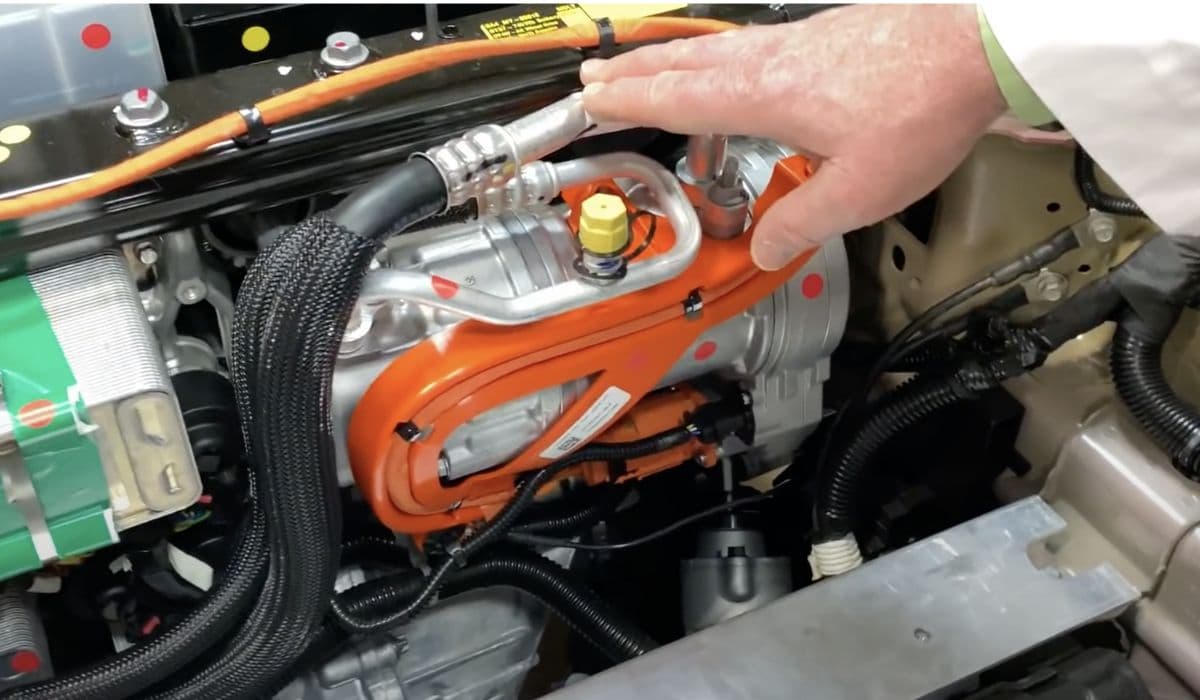
The high-voltage (HV) battery in Tesla vehicles is a critical component that powers the electric drivetrain, and maintaining its temperature is essential for optimal performance and longevity. The coolant system plays a pivotal role in this by circulating a specialized coolant fluid through the battery pack to dissipate heat generated during charging, discharging, and high-load driving conditions. At the heart of this system is the HV battery coolant valve, often referred to as a 3-way or 4-way valve, or sometimes an actuator, depending on the model.

In models like the Tesla Model 3, Model Y, Model S, and Model X, the coolant valve regulates the flow of coolant between the battery, radiator, and other thermal management components. It's typically integrated into the supermanifold or super bottle assembly, which houses pumps and hoses. This valve can switch between series and parallel modes to efficiently manage coolant flow, ensuring the battery stays within the ideal temperature range of about 20-40°C. Over time, factors such as thermal cycling, fluid contamination, or mechanical wear can lead to valve failures, manifesting as leaks, reduced cooling efficiency, or error codes on the vehicle's touchscreen.

Tesla's design emphasizes integration, so the valve is often located in the front trunk (frunk) area or under the vehicle, accessible after removing panels like the underhood apron or aero shield. Understanding the system's layout is crucial: coolant enters the valve from the battery return hose, diverts to the radiator bypass or supermanifold, and is controlled electronically via the vehicle's thermal management software. Faulty valves can trigger alerts like "coolant low" or calibration failures, potentially limiting supercharging speeds or causing overheating risks if ignored.

Signs That Your HV Battery Coolant Valve Needs Replacement

Recognizing early symptoms of a failing HV battery coolant valve can prevent more severe issues, such as battery degradation or drivetrain malfunctions. One common indicator is a persistent "coolant low - contact Tesla service" alert on the dashboard, even after topping off the fluid. This often stems from slow leaks around the valve seals or O-rings, where coolant drips underneath the vehicle, especially noticeable after using cabin heat or during cold weather.

Another sign is irregular battery temperature readings, where the pack overheats during fast charging or extended drives, leading to reduced power output or throttled performance. In diagnostic mode, error codes like VC front A210 (calibration failure) may appear, indicating the valve actuator isn't responding properly. Physical inspection might reveal wet spots or residue near the supermanifold in the frunk, or a hissing sound from air-locked pumps. Owners of older models, such as 2015 Model S, frequently report intermittent leaks that worsen over time, sometimes requiring towing if the coolant level drops critically low.

Additionally, if the coolant pumps run at abnormally high speeds (e.g., hovering at 7000 RPM during purge routines), it suggests air pockets caused by valve malfunctions. Monitoring the coolant level in the reservoir bottle—aiming for between the NOM and MAX lines—can help catch issues early. If these symptoms align, replacement is often more cost-effective than waiting, as prolonged faults could damage the HV battery or related components like the coolant pumps.

Tools and Materials Required for the Replacement

Gathering the right tools and materials beforehand ensures a smooth replacement process and minimizes downtime. Essential hand tools include a Torx T25 or T20 socket set with extensions (4-inch recommended for tight spaces), a ratchet or torque wrench capable of low settings like 1.8 Nm, and flex-head wrenches (10 mm) for nuts in confined areas. A low-profile ratchet helps with screws near frame rails, while an inspection mirror is invaluable for checking seals and alignments without disassembly.

For fluid management, prepare hose clamps or brake line clamps to pinch off coolant lines, reducing spillage to just a cup or two. A coolant drain container or absorbent pads will catch any leaks, and a coolant pressure tester can confirm the fault before starting. Materials-wise, you'll need a new HV battery coolant valve (Tesla part numbers like 6007370-00-E for 3-way valves, priced around $55 from official sources), compatible O-rings (inner purple and outer black), and silicone O-ring lubricant for installation.

Don't forget Tesla-specific coolant like Zerex G48, available at auto parts stores, for refilling—typically a few liters to top off after bleeding. A laptop with Tesla Toolbox software or access to Service Mode via the touchscreen is crucial for diagnostics, purge routines, and configuration checks. Safety gear includes personal protective equipment (PPE) like gloves, eye protection, and ergonomic supports for working under the vehicle. For lifting, a 2-post lift or jack stands are necessary if accessing from below, especially in dual-motor models where the drive unit obstructs frunk access.

Safety Precautions Before Starting the Procedure

Safety is paramount when working on Tesla's HV systems, as they involve high voltages up to 400V and pressurized fluids. Begin by ensuring the vehicle is not charging and is parked on a level surface. Enable Service Mode on the touchscreen to disable high-voltage components, and always disconnect the low-voltage (LV) power first—typically by removing the 12V battery or its connectors—to prevent accidental energization.

Wear appropriate PPE, including insulated gloves rated for electrical work, safety glasses, and closed-toe shoes. Avoid wearing loose clothing or jewelry that could snag on components. If using a lift, position it correctly under the designated points to avoid damaging the battery pack. Handle coolant carefully, as it's glycol-based and can be harmful if ingested or contacted with skin; have spill cleanup materials ready.

Double-check that the vehicle is in Park and not in Drive mode during any routines, as this can interrupt processes like coolant purging. Be mindful of ergonomic practices: use supports when reaching into tight spaces to prevent strain. Finally, if you're not experienced with HV systems, consider consulting a professional, as improper handling could void warranties or lead to costly repairs.

Step-by-Step Guide to Removing the Old Coolant Valve

Removing the faulty HV battery coolant valve requires methodical disassembly to avoid damaging surrounding components. Start by opening the left front door and lowering the window for access, then remove the rear underhood apron and cabin intake duct assembly to expose the frunk area. Enable Service Mode and unlock the gateway on the touchscreen, then run the Coolant Fill/Drain routine to depressurize the system.

Disconnect LV power and remove the front aero shield panel for under-vehicle access. Locate the valve—often attached to the supermanifold—and release the electrical connector by pulling the red tab without pushing down, ensuring the lock disengages. Position a drain container below, then pinch off hoses with clamps to minimize fluid loss.

Remove the mounting bolts or nuts: for example, in Model 3, extract four T25 bolts torqued at 1.8 Nm, using extensions for reach. In Model S, loosen the lower and upper 10 mm nuts at 6 Nm each. Carefully disconnect the hoses—such as the battery return, radiator bypass, and supermanifold lines—by releasing clips and immediately plugging ends to prevent contamination. Pivot and extract the valve, noting the O-ring positions and spline orientation (asymmetrical with one wider side) to aid reinstallation. Inspect for both O-rings adhering to the old unit; if not, retrieve them from the manifold to avoid leaks.

Installing the New HV Battery Coolant Valve

Installation reverses the removal but demands precision for proper sealing and function. Lubricate the new O-rings with silicone lubricant, ensuring the inner purple and outer black rings are seated correctly. Position the new valve with the connector tab facing up, aligning the spline—use a 3D-printed tool or manual rotation to match the 90-degree offset if needed.

Hand-tighten the mounting bolts or nuts initially, then torque them to specifications: 1.8 Nm for Model 3 pumps or 6 Nm for Model S valves. Reconnect the hoses, performing a push-pull-push test on each fitting to confirm security, and fasten clips. Engage the electrical connector and lock the tab.

In dual-motor vehicles, you may need to prop up the super bottle assembly with braces for clearance during this step. Once secured, remove clamps and clean any spilled coolant. Reinstall removed panels like the aero shield and underhood apron, then reconnect LV power.

Bleeding and Refilling the Coolant System

After installation, bleeding air from the system is critical to prevent air locks that could damage pumps or reduce efficiency. Perform a vacuum refill using the touchscreen's Service Mode: navigate to Thermal > Coolant System > Coolant Fill/Drain, and run the routine. Add coolant gradually until the level reaches between NOM and MAX on the reservoir.

Next, initiate the Pump Identification and Coolant Purge routines, allowing them to run for about 10 minutes. Listen for audible pump operation and monitor speeds—3500-6500 RPM is normal; if it sticks at 7000 RPM, repeat the vacuum fill. Top off to the MAX line, as levels may drop slightly post-purge. In some cases, reconnecting the 12V battery alone runs the pumps briefly for initial bleeding, but always verify with software.

For partial refills, use about 1-2 liters of compatible coolant, ensuring no contaminants enter. Check levels the next day after a drive cycle, as settling can reveal minor drops.

Testing and Verifying the Replacement

Verification ensures the new valve functions correctly. Exit Service Mode and start the vehicle to check for alerts; run the thermal system performance test via Toolbox or touchscreen diagnostics. Monitor battery temperatures during a test drive or charging session—stable readings indicate success.

Inspect for leaks by pressurizing the system with a tester, looking for drips around connections. Confirm valve actuation by observing mode switches (series to parallel) in purge routines. If error codes persist, recheck configurations like coolantPumpType (set to DUAL_MIX if needed). A successful replacement should clear warnings and restore full performance, with pumps operating quietly without air noise.

Common Mistakes to Avoid During Replacement

Several pitfalls can complicate the process or cause failures. One frequent error is misalignment of the spline, leading to improper valve operation and calibration faults—always note the orientation before removal. Neglecting to lubricate O-rings can result in tears or poor seals, causing immediate leaks.

Another mistake is inadequate clamping of hoses, resulting in excessive coolant loss and extended bleeding time. Over-torquing bolts risks stripping threads, while under-torquing allows vibrations to loosen them. Skipping the push-pull-push test on fittings might lead to disconnections under pressure. Finally, ignoring software routines post-install can leave air pockets, mimicking original symptoms—always complete purge and identification steps.

Maintenance Tips to Prolong Coolant Valve Life

Regular maintenance extends the valve's lifespan and prevents premature failures. Check coolant levels monthly, topping off as needed with the correct fluid to avoid corrosion. Inspect for leaks during routine services, especially in high-mileage vehicles over 100,000 miles.

Use the vehicle's preconditioning features wisely to reduce thermal stress, and avoid extreme temperature exposures. Periodically run diagnostic routines in Service Mode to catch early anomalies. Replace coolant every 4-5 years or as per Tesla recommendations to flush contaminants. Keeping the frunk clean prevents debris from clogging components, and addressing minor alerts promptly avoids escalation.

Ad Slot #1

More from Tesla

Back to Tesla