
Tesla: How to fix TPMS sensor faults
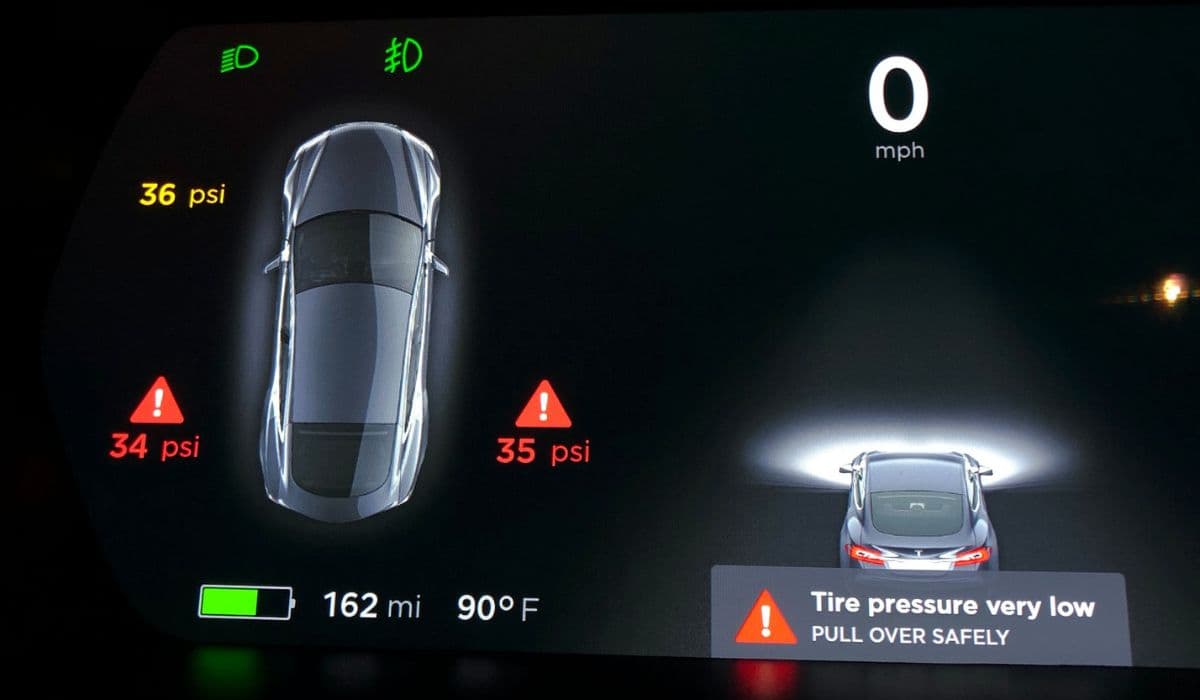
Tesla vehicles rely on a sophisticated Tire Pressure Monitoring System (TPMS) to ensure optimal tire performance, safety, and efficiency. This system uses sensors mounted inside each wheel to continuously track pressure and temperature, alerting drivers to potential issues before they escalate. However, TPMS faults can occur, displaying warnings like "Tire Pressure Monitoring System Fault" or "Pressure sensor fault may clear next drive" on the touchscreen. Understanding these faults and knowing how to address them can save time and maintain your vehicle's peak condition.
Understanding Tesla's TPMS Technology
Tesla's TPMS has evolved over time. Earlier models used radio frequency (433 MHz) sensors, while newer vehicles, including many recent Model 3, Model Y, Model S, and Model X, employ Bluetooth Low Energy (BLE) sensors for more reliable communication. These sensors transmit data directly to the vehicle's computer, providing real-time readings visible on the dashboard card.
The system not only monitors pressure but also detects anomalies like leaks, temperature fluctuations, or sensor malfunctions. When a fault appears, it might flash briefly or persist, indicating anything from a temporary glitch to a hardware issue. Interestingly, the TPMS can sometimes show accurate pressures while still displaying a fault message, highlighting the complexity of its diagnostic logic.
Common Causes of TPMS Faults in Tesla Vehicles
TPMS warnings in Teslas often stem from everyday scenarios rather than major failures. Here are some frequent triggers:
Recent tire changes, rotations, or wheel swaps that confuse the system's sensor recognition.
Battery depletion in older sensors, as internal batteries typically last several years.
Physical damage from potholes, curbs, or improper tire mounting.
Software glitches, especially after over-the-air updates that occasionally affect sensor pairing.
Interference from external factors, though rare in modern BLE systems.
Use of non-compatible aftermarket sensors in vehicles designed for specific types.
These issues can lead to intermittent or persistent alerts, sometimes clearing on their own during a drive but often requiring intervention.
Initial Troubleshooting Steps
Before heading to a service center, try these simple, non-invasive fixes that resolve many TPMS faults:
Perform a full vehicle reboot: Hold both scroll wheels on the steering wheel until the screen resets, or use the touchscreen controls to power off and restart.
Check and adjust tire pressures manually to the recommended levels displayed in the vehicle settings.
Drive the car for several miles above moderate speeds, as the system often auto-learns and re-pairs sensors during motion.
Many owners report that combining a reboot with a short drive wakes dormant sensors and clears transient errors.
Resetting the TPMS System
For faults related to wheel changes or sensor relearning, a manual reset can be effective. Access the touchscreen menu:
Navigate to Controls > Service > Reset TPMS (or similar phrasing, depending on software version).
Select the correct wheel configuration if prompted.
Confirm the reset and drive the vehicle to allow auto-learning to complete.
In some cases, the system prompts automatically after detecting new wheels. Ensure the vehicle remains stationary for a period before driving to facilitate proper sensor detection. This process can take minutes of driving to finalize, updating the dashboard with accurate readings.
Advanced DIY Fixes for Persistent Issues
If basic resets fail, consider these owner-reported techniques:
Deflate each tire slightly (about 10-15 PSI below recommended) and immediately reinflate to spec. This "wakes" the sensors by forcing them to transmit fresh data.
Park the vehicle for an extended period (overnight or longer) to allow full sleep mode, then drive to trigger relearning.
Remove any USB-powered devices from the car, as they can occasionally interfere with wireless signals in certain setups.
These methods have helped numerous drivers avoid service visits by reactivating sensors without tools.
When to Replace TPMS Sensors
Persistent faults, especially affecting one specific wheel or recurring after resets, often point to a failing sensor. Signs include:
Consistent "--" readings for a single tire despite correct pressure.
Warnings that return immediately after clearing.
Damage visible during tire inspections.
Replacement involves demounting the tire to access the internal sensor. Professional installation is recommended to avoid further damage. Tesla's BLE sensors pair automatically upon installation and driving, requiring no programming in most cases. Opting for compatible replacements ensures seamless integration.
Preventive Maintenance for TPMS Health
Keeping your TPMS reliable involves routine habits:
Regularly inspect tires for damage and maintain proper inflation, as extreme conditions accelerate sensor wear.
Update vehicle software promptly, as fixes for TPMS bugs are often included.
During seasonal wheel swaps, verify sensor compatibility and perform resets immediately.
Avoid harsh impacts and monitor for early warning signs.
Proactive care extends sensor life and minimizes disruptions.
By methodically addressing TPMS faults—from simple reboots to targeted resets—most Tesla owners can restore full functionality quickly. This system's design prioritizes safety through constant vigilance, rewarding attentive drivers with fewer surprises on the road.
More from Tesla
How to fix HVAC blend door actuator clicking noise Tesla
16.12.2025 13:16
How to fix FSD visualization lag after Tesla 2025.14 update
16.12.2025 07:02
How to fix phantom drain overnight Tesla
16.12.2025 04:50
How to replace octopus coolant leak (Tesla Model 3 2017–2020)
16.12.2025 03:21
How to replace torn rear seat bolsters Tesla
16.12.2025 03:09