Tesla: How to replace coolant pump in battery pack
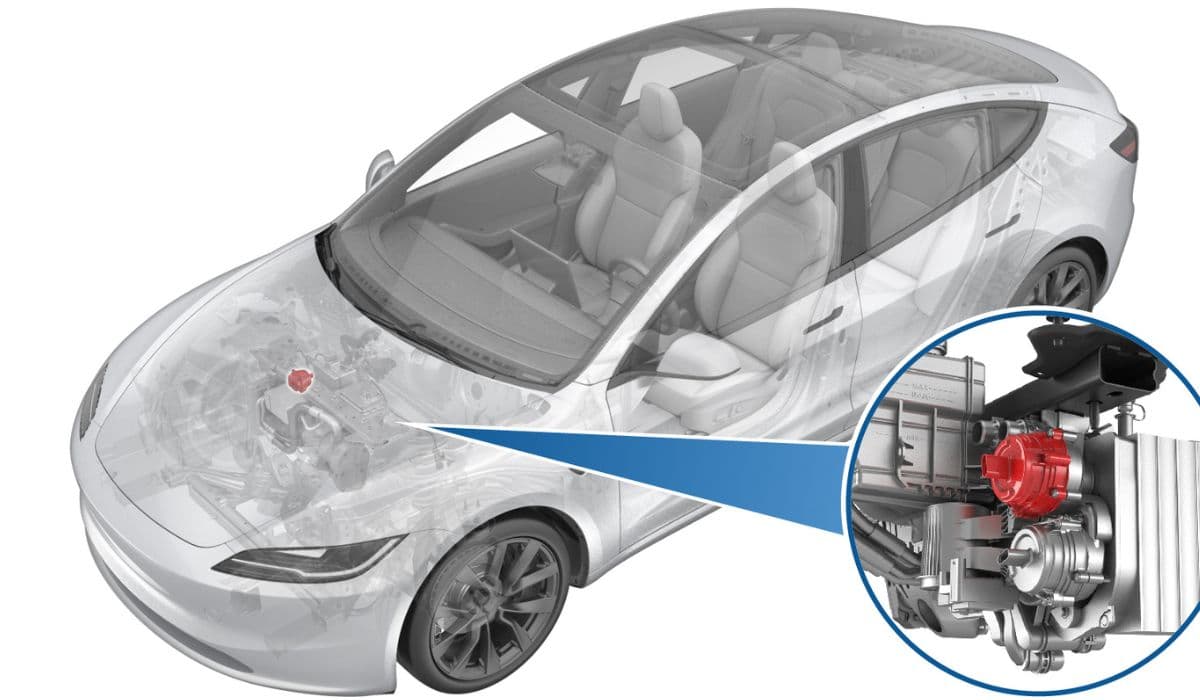
The coolant pump in a Tesla's battery pack plays a critical role in maintaining optimal thermal conditions for the high-voltage battery system. This component circulates specialized coolant through the battery modules, ensuring even temperature distribution during charging, discharging, and high-performance driving. In electric vehicles like the Model 3, Model Y, Model S, and others, the battery pack generates significant heat, especially under rapid acceleration or fast charging scenarios. Without efficient cooling, cells could overheat, leading to reduced efficiency, accelerated degradation, or even safety risks such as thermal runaway.
Tesla's coolant system typically integrates multiple pumps, including those dedicated to the battery, powertrain, and sometimes heat pump variants. The high-voltage battery coolant pump, often mounted on a supermanifold or superbottle assembly, operates as an electric water pump that pushes glycol-based coolant through intricate channels within the battery pack. This setup not only cools the battery but also heats it in cold weather to optimize performance and longevity. For instance, in dual-motor configurations, the pump works in tandem with others to manage thermal loads across the drivetrain.
Key to its function is the integration with the vehicle's thermal management software, which monitors temperatures via sensors and adjusts pump speeds accordingly. Pumps can run at variable RPMs, from idle around 1500 to peaks of 6500 during normal operation, ensuring precise control. Over time, wear from constant cycling, debris in the coolant, or electrical faults can compromise the pump, necessitating replacement to preserve the battery's health and the vehicle's overall range and power output.
Identifying Symptoms of a Failing Coolant Pump
Recognizing early signs of coolant pump failure can prevent costly damage to your Tesla's battery pack. One common indicator is unusual noises from the front or underbody area, such as whining or grinding sounds during operation, which suggest bearing wear or impeller damage inside the pump. Overheating warnings on the dashboard, reduced driving range, or slower charging times often point to inadequate coolant circulation, as the battery struggles to maintain ideal temperatures.
Coolant leaks are another telltale sign; you might notice pink, orange, or green fluid pooling under the vehicle, especially near the frunk or front underbody panels. In advanced cases, diagnostic trouble codes (DTCs) may appear via the Tesla app or touchscreen, such as those related to thermal system faults or low coolant pressure. For example, if the pump speed hovers abnormally high at around 7000 RPM during tests, it could indicate air locks or pump inefficiency.
Performance degradation, like limited power output in Ludicrous or Plaid modes on Model S, or inconsistent regenerative braking, can also stem from pump issues. Regular inspections during service intervals—typically every 12,500 miles or annually—help catch these problems early. If ignored, a failing pump could lead to uneven cell temperatures, reducing battery capacity by up to 10-20% over time or triggering warranty-voiding failures.
Essential Tools and Materials for the Replacement
Gathering the right tools and materials ensures a smooth replacement process and minimizes risks. Start with basic mechanic's tools: a Torx T20 or T25 socket set, depending on your model, paired with a 2-4 inch extension and a ratchet or torque wrench capable of precise settings like 1.8 Nm (1.3 lbs-ft) for pump bolts. A 2-post lift or jack stands rated for your Tesla's weight—around 4,000-5,000 lbs—are essential for safe underbody access.
For coolant handling, prepare a drain container with at least 5-10 liters capacity, absorbent materials for spills, and hose clamps to secure lines during disconnection. Silicone O-ring lubricant is crucial for sealing new components, along with replacement O-rings (inner purple and outer black) to prevent leaks. You'll need fresh Tesla-approved coolant, typically a premixed glycol solution, in quantities of 5-8 liters based on the model.
Electrical tools include a multimeter for checking connectors and a scan tool or access to the vehicle's touchscreen for Service Mode activation. Personal protective equipment (PPE) such as gloves, safety glasses, and insulated tools are non-negotiable when dealing with high-voltage systems. For specific models, masking tape for labeling connectors and a marker for aligning rubber isolators can save time during reassembly. Always source genuine Tesla parts or OEM equivalents like Pierburg pumps to match specifications and avoid compatibility issues.
Preparing Your Tesla for the Procedure
Proper preparation sets the foundation for a successful coolant pump replacement. Begin by parking the vehicle on a level surface and ensuring it's not charging. Open the driver's door and lower the window for access, then remove any underhood aprons or intake ducts to expose the thermal system components. For most models, this involves clipping off the rear underhood apron and the cabin intake upper duct assembly.
Activate Service Mode via the touchscreen under Controls > Service, which disables high-voltage systems and allows diagnostic routines. Unlock the vehicle gateway if prompted, a step that grants deeper system access for thermal management tasks. Disconnect low-voltage (LV) power by removing the 12V battery connector or following model-specific procedures to de-energize the vehicle safely.
Raise the Tesla using a 2-post lift, ensuring lift arms are positioned correctly under reinforced points to avoid damaging the battery pack. Remove protective panels like the front aero shield to access the supermanifold area. Run a coolant fill/drain routine on the touchscreen to partially empty the system, reducing spill risks. Label all electrical connectors and hoses with masking tape to track their positions, as misconnections can lead to system errors. Finally, inspect the area for any pre-existing damage or debris that could complicate the job.
Draining the Coolant System Safely
Safe coolant drainage is vital to avoid environmental hazards and component damage. Position a large drain container beneath the pump area, ideally under the supermanifold or superbottle. Initiate the coolant drain routine in Service Mode: navigate to Thermal > Coolant System > Coolant Fill/Drain, and run it until completion, which may take 10-15 minutes.
For manual drainage, clamp the inlet and outlet hoses to minimize flow, then carefully release them over the container. Expect 3-5 liters of coolant to drain initially, depending on the system volume. Monitor for air bubbles or contaminants in the fluid, as these could indicate broader issues like blockages. Clean any spills immediately with absorbent pads to prevent slips or corrosion on nearby parts.
In heat pump-equipped models, additional valves may need cycling to fully evacuate the system. After drainage, perform a vacuum refill test to check for leaks before proceeding. Always handle coolant with care—it's toxic and should be disposed of at a certified recycling facility. Top off the reservoir bottle to the nominal line if partial refill is needed mid-procedure, ensuring no air enters the lines.
Removing the Old Coolant Pump
With the system drained, proceed to remove the faulty pump. Start by disconnecting the electrical connector: pull the red tab to release the lock without pushing down, then gently pull the connector free. For dual-motor setups, label this connector to distinguish it from nearby powertrain pumps.
Remove the four mounting bolts using a Torx T20 or T25 socket, torqued at 1.8 Nm—work in a cross-pattern to avoid warping. Carefully slide the pump off the supermanifold, ensuring both O-rings detach with it to prevent them from falling into the system. In older Model S variants, you might need to remove additional brackets or shock tower braces for access, involving bolts torqued at 6.5 Nm.
Inspect the removed pump for signs of failure, such as cracked housings or seized impellers, and clean the mounting area of debris or old sealant. For 1st generation RWD models, handle the rubber isolator carefully, marking its alignment for reinstallation. This step typically takes 20-30 minutes, but rushing can lead to damaged threads or lost parts.
Installing the New Coolant Pump
Installation begins with preparing the new pump: apply silicone lubricant to fresh O-rings and position them securely. Align the pump outlet upward and insert it fully into the supermanifold, ensuring a snug fit. Hand-tighten the four bolts, starting with the upper right for easier access, then torque them in a cross-pattern to 1.8 Nm.
Reconnect the electrical harness, engaging the locking tab firmly. In Model 3 and Y, verify the connector tab faces up to match factory orientation. For Model S 2nd generation, slide the pump onto its bracket before securing. Double-check all connections to prevent electrical faults.
Once mounted, remove the drain container and wipe down the area. This phase emphasizes precision to avoid air pockets or misalignments that could cause immediate failures.
Refilling and Bleeding the Coolant System
Refilling requires a vacuum refill tool or the vehicle's built-in routine to eliminate air. Run the cooling system vacuum refill in Service Mode, adding coolant until the reservoir reaches between the NOM and MAX lines. Top off to the MAX line with approved fluid.
Perform a coolant purge: navigate to Thermal > Coolant System > Coolant Purge Start, allowing it to run for about 10 minutes. Listen for pump activation and monitor RPMs—3500-6500 indicates proper flow; 7000 RPM signals air locks, requiring repeat vacuum fills. Cycle valves between series and parallel modes if applicable.
Inspect levels post-purge, adding more coolant as needed. This bleeding process ensures no trapped air impairs circulation, which could overheat the battery.
Testing and Verifying the Replacement
Post-installation testing confirms functionality. Exit Service Mode and reconnect LV power. Start the vehicle and monitor the touchscreen for thermal system status—no errors should appear. Run a pump identification routine to verify the new component's configuration, adjusting to DUAL_MIX if necessary for dual-motor vehicles.
Drive the Tesla in a controlled environment, checking for leaks, unusual noises, or temperature anomalies. Use the app to track battery temps during charging and driving. If DTCs persist, re-enter Service Mode for diagnostics. Successful verification might include cleared codes and restored performance, ensuring the battery pack operates efficiently.
Model-Specific Considerations for Replacement
Different Tesla models have unique nuances. For Model 3 and Y dual-motor variants, access involves removing the HEPA filter and fresh intake duct, with pumps integrated into the superbottle. Model S 1st generation RWD requires coolant reservoir removal first, handling isolators carefully.
In 2nd generation Model S, disconnect wiper arms and cowl panels for access, with pumps located near shock towers. Heat pump-equipped vehicles like newer Model 3 may need additional thermal routines. Always check your VIN for generation-specific steps, as post-2016 builds use updated brackets. Cybertruck or Plaid variants might feature higher-capacity pumps, requiring compatible replacements.
Safety Measures and Best Practices
Prioritize safety by always disconnecting LV power before high-voltage work. Use insulated tools and PPE to mitigate shock risks. Work in a well-ventilated area to avoid coolant fumes, and never ingest or expose skin to the fluid.
Follow torque specs meticulously to prevent stripped bolts or leaks. Document each step with photos for reference. If uncomfortable with any part, consult a certified Tesla technician, as improper handling could void warranties. Regular coolant flushes every 4 years or 50,000 miles extend pump life.
Troubleshooting Common Issues Post-Replacement
If problems arise after replacement, address them systematically. Persistent leaks often stem from unlubricated O-rings or incomplete seating—reinspect and reseal. High RPM during purges indicate air; repeat bleeding multiple times.
Electrical errors might mean swapped connectors in multi-pump setups—relabel and reconnect correctly. Overheating could result from low coolant levels or blocked lines; flush the system thoroughly. Noisy operation post-install suggests impeller misalignment—remove and realign the pump. For software glitches, reset the gateway or update firmware via the touchscreen. Persistent issues warrant professional diagnostics to rule out sensor faults or related component failures.
More from Tesla

How to fix HVAC blend door actuator clicking noise Tesla
16.12.2025 16:16
How to fix FSD visualization lag after Tesla 2025.14 update
16.12.2025 10:02
How to fix phantom drain overnight Tesla
16.12.2025 07:50
How to replace octopus coolant leak (Tesla Model 3 2017–2020)
16.12.2025 06:21
How to replace torn rear seat bolsters Tesla
16.12.2025 06:09